Published 10 March 2026 | Updated 25 May 2026
Technology
What Is Cronometer App? Complete Guide 2026
Health and wellness have become a major focus for Australians, driving the demand for tools that make nutrition management easier. Nutrition tracking apps help users monitor calorie intake, track nutrients, and maintain a balanced diet. Among them, Cronometer stands out for its accuracy, detailed tracking, and user-friendly interface. Whether using a calorie counting app free or a premium best calorie counting app, Australians are leveraging these apps to achieve fitness goals. This blog explores why Cronometer is trending and its key benefits.
Quick AnswerThe Cronometer app is a powerful nutrition and calorie tracking application that helps users monitor food intake, macros, micronutrients, hydration, exercise, and overall wellness. Unlike many basic calorie-tracking apps, Cronometer provides highly accurate nutritional data, wearable integrations, and advanced health analytics, making it one of the best nutrition tracking apps in 2026 for fitness enthusiasts, athletes, healthcare professionals, and wellness startups. |
- The Cronometer app tracks 80+ micronutrients with clinical-grade accuracy — far beyond basic calorie counting apps.
- Cronometer cost is flexible: free tier covers most users; Gold at ~$9.99/month serves power users and athletes.
- It integrates with Apple Health, Fitbit, Garmin, Withings, and Oura Ring for complete, automatic health tracking.
- Australia is one of the fastest-growing markets for nutrition tracking apps, driven by health awareness and wearable adoption.
- AI features — Oracle meal planner, nutrient alerts, and predictive trends — make Cronometer the best calorie counting app for personalisation in 2026.
- The global nutrition app market is projected to exceed USD 3.7 billion by 2030 — a significant opportunity for startups entering the space.
- PerfectionGeeks can help you build a Cronometer-style nutrition app with custom features, AI integration, and wearable sync.
What Is Cronometer App?
The Cronometer app is a precision nutrition tracking application available on iOS, Android, and web browsers. Unlike generic calorie counters, Cronometer tracks over 80 micronutrients — including vitamins A, B12, D, K2, zinc, magnesium, and omega-3 fatty acids — alongside standard macronutrients. It is used by dietitians, biohackers, athletes, and everyday health-conscious users who need clinical-grade accuracy rather than estimates.
Founded in 2005 by Aaron Davidson and headquartered in Revelstoke, BC, Canada, Cronometer has grown into one of the most trusted nutrition tracking apps globally, with particular popularity in Australia, the USA, and the UK. If you have been searching for what is Cronometer app and whether it lives up to its reputation — the short answer is yes, and this guide explains exactly why.
How Cronometer App Works
Understanding how the Cronometer app works helps users extract maximum value from day one. The app operates on a simple four-step loop:
- Log your food — search the database of 1,000,000+ verified foods, scan barcodes, or create custom recipes.
- View your nutrient dashboard — see real-time breakdowns of macros, micros, calories, and energy balance.
- Set personalised targets — configure goals for weight loss, muscle gain, keto, or fully custom macros.
- Track progress over time — review weekly trends, export reports, and share data with a dietitian or doctor.
The Cronometer app's food database is sourced from the USDA, NCCDB, and other peer-reviewed nutritional databases — making it significantly more accurate than the community-generated databases used by rival calorie counting apps. This is a key reason dietitians recommend it as the best app for calorie counting for clinical and therapeutic purposes.
| Build Your Own Nutrition App? PerfectionGeeks has delivered 200+ apps since 2014. Get a free consultation today and see how we can bring your idea to life. Talk to a Tech Expert — Free Consultation |
Why Cronometer App Is Popular in 2026
Among nutrition tracking apps, Cronometer stands out due to its detailed nutrient tracking and comprehensive features. The Cronometer app allows users to log meals, scan barcodes, track calories, monitor nutrients, and even integrate with fitness devices.
Here’s what makes Cronometer popular in Australia:
Detailed Nutrient Tracking: Cronometer tracks not only calories but also vitamins, minerals, and macronutrients, giving users a complete nutritional overview.
Integration with Devices: It syncs with wearables like smartwatches and fitness bands for real-time data.
Custom Goals: Users can set personalized goals for calories, macros, and micronutrients.
Accurate Food Database: The app has a large database of verified foods for precise tracking.
Free and Premium Options: The calorie counting app free version covers basic tracking, while premium features provide advanced analytics.
The Cronometer cost is flexible, allowing casual users and fitness enthusiasts to choose a plan that fits their needs. Many users consider it the best app for calorie counting due to its accuracy, ease of use, and comprehensive features.
Rising Health & Fitness Awareness in Australia
Australia has seen a significant increase in health and fitness awareness. People are more conscious of the effects of diet on overall health, and this trend has fueled the popularity of calorie counting apps and nutrition tracking apps.
Key factors driving this trend include:
Preventive Health Focus: Australians are increasingly focused on maintaining long-term wellness.
Growing Fitness Culture: Exercise routines and diet plans are becoming part of everyday life.
Technological Accessibility: Mobile devices and apps make nutrition tracking easy and convenient.
Lifestyle Changes: Work-from-home routines and increased home cooking have increased interest in diet tracking.
The rising health consciousness has made apps like Cronometer a trusted choice for people who want accurate tracking and actionable insights to support their goals.
Benefits of Using Nutrition Tracking Apps
Using a calorie counting app offers numerous benefits, both for casual users and fitness enthusiasts. Some key advantages include:
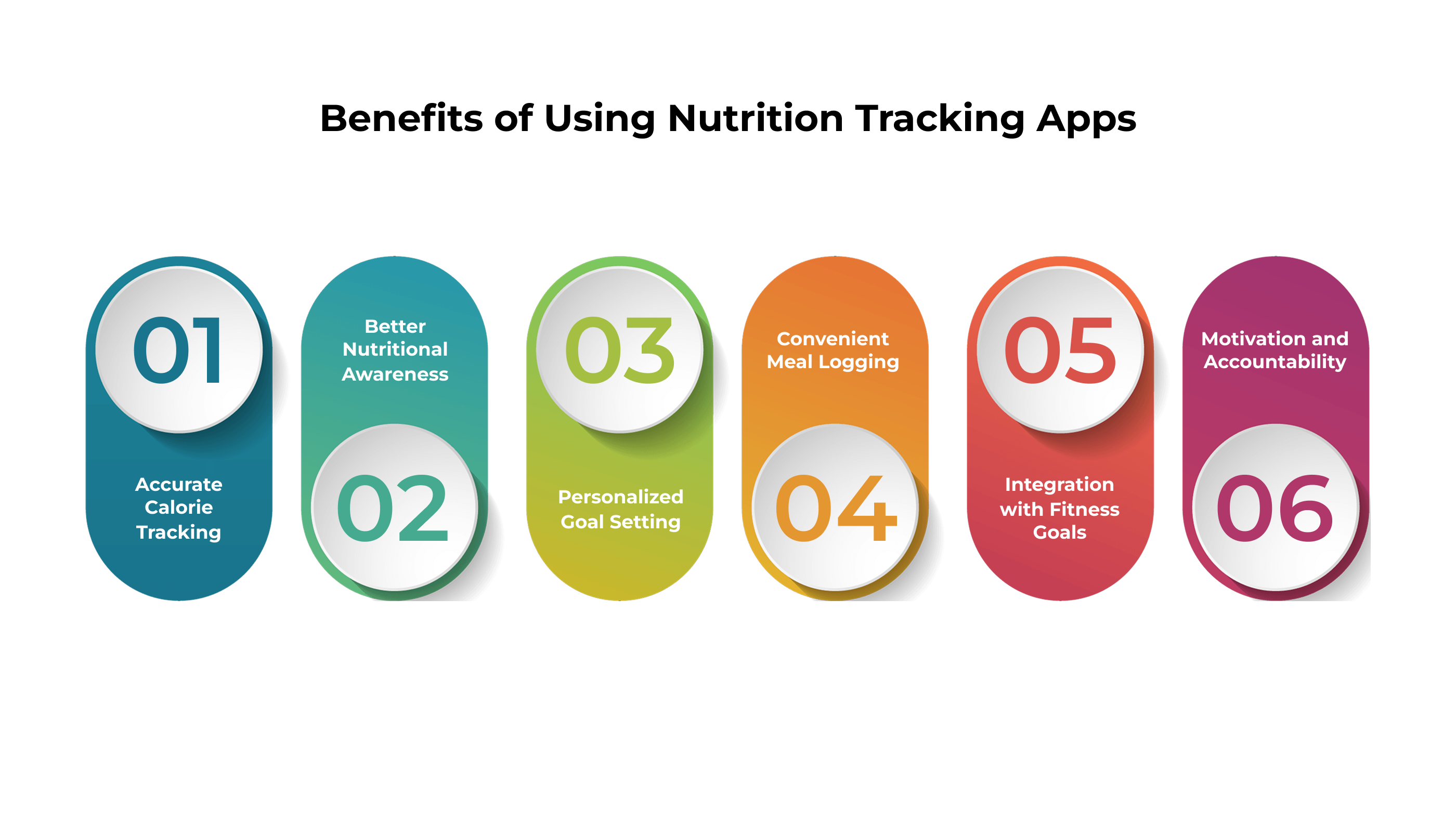
Accurate Calorie Tracking
Using a calorie counting app allows users to log their meals in real-time, ensuring they know exactly how many calories they consume. This precise tracking is crucial for weight management, fat loss, or muscle gain, as users can adjust their diet based on actual intake rather than estimates.
Better Nutritional Awareness
Apps like Cronometer provide a detailed breakdown of macronutrients (proteins, carbs, fats) and micronutrients (vitamins, minerals). This insight helps users understand their diet better, identify nutrient deficiencies, and make informed choices to maintain a balanced and healthy lifestyle.
Personalized Goal Setting
Nutrition tracking apps allow users to set specific targets for calories, macros, or micronutrients. By monitoring progress over time, users can adjust their food intake to meet their health objectives, whether it’s weight loss, muscle building, or maintaining overall wellness.
Convenient Meal Logging
Logging meals is quick and easy with these apps, allowing users to record what they eat anytime and anywhere. This convenience ensures consistency in tracking, reduces reliance on memory, and prevents accidental over- or underestimation of calories.
Integration with Fitness Goals
Many apps sync with wearable devices or fitness trackers to monitor calories burned during workouts. This integration provides a complete view of energy balance, combining diet and exercise data to help users achieve their fitness goals more effectively.
Motivation and Accountability
Daily tracking creates a sense of responsibility and accountability. Users can see their progress, set milestones, and stay motivated to stick with their dietary and fitness routines, which ultimately leads to healthier long-term habits.
Step-by-Step Guide: Getting Started with Cronometer
- Download the Cronometer app — available free on the App Store (iOS) and Google Play (Android), or at cronometer.com.
- Create your profile — enter age, height, weight, activity level, and primary health goal.
- Set your targets — choose from preset goals (weight loss, muscle gain, maintenance) or enter fully custom macros.
- Log your first meal — search by name, scan a barcode, or use voice logging (Gold plan).
- Review your nutrient wheel — the colour-coded wheel shows which nutrients you have hit and which need attention.
- Connect a wearable — sync Fitbit, Apple Watch, Garmin, or Google Fit for automatic calorie burn data.
- Review weekly trends — use the Trends tab to spot deficiencies and adjust your meal plan accordingly.
- Upgrade to Gold if needed — for biometric tracking, advanced reports, AI meal planning, and an ad-free experience.
Cronometer App Cost — Free vs Gold Plan
A common question from users comparing the best calorie counting app options is: how much does Cronometer cost? Here is a clear breakdown of what is Cronometer app pricing in 2026:
| Feature | Cronometer Free | Cronometer Gold |
|---|---|---|
| Calorie & macro tracking | ✅ | ✅ |
| 80+ micronutrient tracking | ✅ | ✅ |
| Barcode scanning | ✅ | ✅ |
| Wearable sync | ✅ | ✅ |
| Custom goals & targets | Limited | ✅ Full |
| Biometric tracking | ❌ | ✅ |
| Advanced reports & export | ❌ | ✅ |
| Ad-free experience | ❌ | ✅ |
| Oracle AI meal planner | ❌ | ✅ |
| Cronometer cost / price | Free | ~$9.99 USD/month or $49.99/year |
For most users, the free calorie counting app free tier is sufficient for daily nutrition tracking. Serious athletes, biohackers, or anyone working alongside a dietitian typically upgrade to Gold for biometric tracking and export features. At ~$9.99/month, the Cronometer cost is considerably lower than Noom (~$59/month) and more affordable than MyFitnessPal Premium (~$19.99/month), while delivering superior micronutrient depth.
AI & Personalisation Features Driving Engagement
Modern best calorie counting apps in 2026 are defined by their use of artificial intelligence to move beyond simple logging. The Cronometer app has invested heavily in this area:
- Oracle Meal Planner (Gold): AI suggests meal options based on your remaining nutrient targets for the day.
- Smart Nutrient Alerts: Push notifications when a critical micronutrient (Vitamin D, Iron, Magnesium) falls below your personal threshold.
- Predictive Trend Analysis: The Trends tab uses historical data to project whether you will hit your weekly calorie and macro goals.
- Personalised Supplement Suggestions: Based on consistent nutrient gaps, Cronometer surfaces targeted supplement options tailored to your profile.
According to Grand View Research, the global nutrition app market was valued at USD 1.6 billion in 2023 and is projected to grow at a CAGR of 17.6% through 2030 — driven largely by AI personalisation features of the kind built into Cronometer. (Source: Grand View Research, 2024.)
Integration with Wearables and Smart Devices
One of the most-searched aspects of "what is Cronometer app" relates to device compatibility. In 2026, Cronometer syncs seamlessly with:
- Apple Health (iOS) — automatic step count, active calories, and heart rate data.
- Google Fit (Android) — activity and sleep data synced in real time.
- Fitbit — two-way calorie sync between the apps.
- Garmin Connect — workout data and calories burned.
- Withings smart scales — automatic body weight and body fat percentage logging.
- Oura Ring — sleep quality and recovery scores.
This makes Cronometer one of the most connected calorie tracking mobile apps available — important for Australian users, who have adopted wearable health devices at one of the highest rates globally. According to Statista, Australia had over 7.2 million wearable device users in 2024, a figure projected to exceed 9 million by 2026. (Source: Statista, 2024.)
Impact of COVID-19 and Lifestyle Changes
The COVID-19 pandemic has accelerated the adoption of nutrition tracking apps. With gyms closed, remote work increasing, and more people cooking at home, Australians have relied on apps like Cronometer to monitor their nutrition and maintain healthy habits.
Key impacts include:
Home Meal Logging: Users track food intake while cooking at home.
Focus on Immunity: Nutrition apps help maintain balanced diets for better health.
Remote Fitness Integration: Syncing with smart devices allows users to maintain routines at home.
As a result, calorie counting apps free and premium versions have seen a surge in downloads and active usage in Australia.
Nutrition Tracking App Development Trends in 2026
The growing popularity of calorie tracking mobile apps has encouraged startups and businesses to invest in calorie tracking app development. Current trends include:
Cross-Platform Development: Developers are increasingly building apps that function seamlessly on both iOS and Android devices. This approach maximizes reach, allowing more users to download and use the app regardless of their smartphone platform. Cross-platform development also reduces development costs and speeds up release cycles.
Cloud Integration: Nutrition and fitness apps now rely on cloud technology to store and manage user data securely. Cloud integration ensures that a user’s meal logs, activity data, and health metrics are synchronized across all devices, providing convenience and backup in case of device loss.
Data Analytics: Modern calorie tracking apps offer dashboards that analyze calorie intake, nutrient distribution, and fitness activity trends. These insights help users make informed decisions about their diet, adjust meal plans, and track progress toward fitness goals over time.
Gamification: Apps are using gamified elements like challenges, streaks, badges, and rewards to keep users motivated. This interactive approach encourages regular engagement, making daily nutrition tracking fun while fostering healthy habits and long-term user retention.
Subscription Models: Many apps offer a calorie counting app free version for basic tracking and optional premium subscriptions for advanced features. Subscription models provide users with additional analytics, AI recommendations, and personalized insights, while generating revenue to support continuous app improvements.
These trends are shaping how developers approach calorie tracking app development, creating apps that are interactive, scalable, secure, and tailored to the needs of health-conscious Australians.
Why Australian Users Prefer Cronometer App in 2026
Australia ranks among the top five markets for nutrition tracking app downloads globally. Several specific factors drive the preference for Cronometer over competing calorie counting apps:
Accurate micronutrient data for Australian foods: Cronometer incorporates FSANZ (Food Standards Australia New Zealand) data alongside USDA data, making it far more relevant for Australian users than apps relying on US-only databases.
Rising chronic disease awareness: With over 1 in 2 Australians living with a chronic condition (AIHW, 2023), nutrition tracking has moved from fitness culture into mainstream preventive health — and Cronometer's clinical-grade tracking meets that need.
Post-pandemic home cooking habits: Australians who shifted to home cooking during COVID-19 lockdowns largely continued the habit — and continued needing a reliable calorie counter app to go with it.
High wearable device adoption: The strong penetration of Apple Watch, Fitbit, and Garmin devices in Australia makes Cronometer's deep integration particularly valuable for local users.
Flexible Cronometer cost: The calorie counting app free tier eliminates financial barriers, while Gold remains affordable relative to competing apps like Noom — making the Cronometer app accessible across income levels.
Comparison of Best Calorie Counting Apps in 2026
| Feature | Cronometer | MyFitnessPal | Lose It! | Noom |
|---|---|---|---|---|
| Micronutrient depth | 80+ nutrients | Limited | Limited | Very limited |
| Barcode scanning | Yes | Yes | Yes | No |
| AI meal suggestions | Yes (Gold) | Yes (Premium) | No | Yes |
| Wearable sync | Yes | Yes | Yes | Limited |
| Free version | Yes | Yes | Yes | Trial only |
| Cronometer cost / price | Free | $9.99/mo Gold | Free | $19.99/mo | Free | $19.99/mo | ~$59/mo |
| Best for | Precision nutrition | Casual tracking | Weight loss | Behaviour change |
Cronometer consistently outperforms rivals on micronutrient depth and database accuracy — the key differentiator that makes it the best calorie counting app for users who need more than basic macro tracking.
Want to Build a Nutrition App Like Cronometer?
PerfectionGeeks specialises in calorie tracking app development for startups in Australia, USA, and India. 200+ apps delivered since 2014.
👉 Get a Free Quote
Common Mistakes to Avoid When Using Cronometer
- Logging estimated portions instead of weighed amounts — precision is Cronometer's core advantage; use a kitchen scale for accurate data.
- Focusing only on calories and ignoring the nutrient wheel — the micronutrient dashboard is what separates this app from every other calorie counter app; check it daily.
- Not syncing your wearable device — without calorie burn data from a wearable, your energy balance calculation is incomplete.
- Expecting Gold features on the free plan — understand which tier suits your needs before building your routine around unavailable features.
- Failing to update your current body weight regularly — Cronometer recalculates your TDEE based on weight; outdated entries skew all recommendations.
- Trusting unverified community food entries — always cross-check custom entries against the verified USDA or NCCDB database entries for accuracy.
Expert Tips for Using Cronometer in 2026
- Set a morning logging routine — enter breakfast immediately after eating to build the daily tracking habit before the rest of the day takes over.
- Pre-log meals the night before — Cronometer's meal copy feature makes this fast; pre-logging is proven to reduce overeating by increasing dietary awareness.
- Use the Recipe Builder for meal prep — calculate the exact nutritional profile of batch-cooked meals once, then log with a single tap all week.
- Review Trends weekly, not daily — daily calorie fluctuations are entirely normal; weekly averages reveal the true patterns that drive results.
- Export a monthly PDF report and share with your dietitian — the Gold export feature turns this into a one-tap task that makes your appointments far more productive.
- Log biometric entries alongside nutrition — blood pressure, cholesterol, glucose, and weight data in one place creates a complete preventive health picture.
- For startups building a calorie counter app in 2026: prioritise micronutrient accuracy, wearable integration, and AI meal suggestions — the three features that drive Cronometer's industry-leading user retention.
Frequently Asked Questions
Quick answers related to this article from PerfectionGeeks.
1. What is a nutrition tracking app?
2. Is Cronometer app free?
3. What is Cronometer app cost for the premium plan?
4. What is the best calorie counting app in Australia in 2026?
5. How does Cronometer app compare to MyFitnessPal?
Conclusion
The Cronometer app has evolved far beyond a basic calorie counter. In 2026, it stands among the most advanced nutrition tracking platforms available, combining micronutrient precision, AI-powered recommendations, wearable integrations, and personalized analytics in one ecosystem.
Whether you are an athlete, healthcare user, biohacker, or startup exploring nutrition app development, Cronometer demonstrates how modern health-tech platforms are reshaping preventive wellness globally.
For businesses planning to build a nutrition tracking app like Cronometer, investing in AI, wearable integration, and advanced analytics will be critical for long-term user engagement and growth.

Written By Shrey Bhardwaj
Director & Founder
Shrey Bhardwaj is the Director & Founder of PerfectionGeeks Technologies, bringing extensive experience in software development and digital innovation. His expertise spans mobile app development, custom software solutions, UI/UX design, and emerging technologies such as Artificial Intelligence and Blockchain. Known for delivering scalable, secure, and high-performance digital products, Shrey helps startups and enterprises achieve sustainable growth. His strategic leadership and client-centric approach empower businesses to streamline operations, enhance user experience, and maximize long-term ROI through technology-driven solutions.