
Published 21 August 2025 | Updated 24 May 2026
Technology
How Odoo ERP Simplifies Modern Restaurant Management
Managing a restaurant is not just about serving food. It includes handling staff, taking orders, managing the kitchen, checking inventory, and looking after customers. Doing all this manually can be confusing and time-consuming. That is why many restaurants now use ERP software for restaurants to make their work easier.One of the most powerful tools for this is Odoo ERP. It is flexible, simple to use, and designed for businesses of every size. With the right setup, Odoo can manage almost every part of a restaurant, from the modern restaurant kitchen to customer service and financial tracking.
Quick AnswerOdoo ERP for restaurant management is an enterprise resource planning system that connects every layer of your restaurant — point-of-sale, kitchen operations, inventory, purchasing, HR, and accounting — into one unified platform. Instead of juggling five separate tools that don't talk to each other, a single Odoo ERP installation gives restaurant owners real-time visibility across every department, eliminates manual data entry between systems, and dramatically reduces food cost leakage and operational errors. It is one of the most cost-effective and flexible ERP solutions for restaurants available in 2026. |
- Odoo restaurant management unifies POS, KDS, inventory, HR, and accounting in one platform, eliminating data silos.
- The best odoo restaurant management setups start with a proper Bill of Materials (BOM) for every menu item to enable real-time inventory deduction.
- Odoo restaurant management cost ranges from free (Community) to $5,000–$25,000+ for full enterprise implementation, depending on scale.
- Odoo 17 (2025–2026) adds AI demand forecasting, WhatsApp integration, and an improved mobile POS — making it the most capable version for restaurants yet.
- Multi-location restaurant chains benefit significantly from Odoo's Multi-Company module and centralised procurement capabilities.
- PerfectionGeeks Technologies has delivered 200+ Odoo apps since 2014 and offers a free consultation to help restaurants assess the right implementation path.
What Is Odoo ERP for Restaurant Management? (Quick Definition)
Odoo ERP for restaurant management is an implementation of the Odoo open-source ERP (Enterprise Resource Planning) platform configured specifically for the food and beverage industry. Unlike a traditional POS system that only records sales, an ERP system connects every business process — operational, financial, and human — into a single integrated data environment.
In restaurant terms, that means a single order placed at your table triggers a cascade of automatic updates across your entire business: stock levels fall, the kitchen queue updates, the daily revenue ledger records the sale, and the food cost percentage recalculates — all without anyone touching a spreadsheet or copying data between systems.
The global restaurant management software market is projected to exceed $14.5 billion by 2027, growing at a CAGR of 15.2% (Source: Statista). Within that market, ERP-based platforms like Odoo are growing fastest because they solve the root problem most restaurant software only patches: data fragmentation.
Role of Odoo in Restaurant Management
The role of Odoo is to bring different restaurant activities into one system. Normally, restaurants use separate tools for billing, stock, and accounts. This creates gaps and makes it harder to keep things in sync.
With Odoo ERP integration, restaurants can manage everything from one platform. For example, when a customer places an order, the Odoo POS system sends the details straight to the modern restaurant kitchen. Inventory is updated automatically, and sales records are saved for accounts. This reduces errors, saves time, and improves service. The Odoo restaurant management system also helps staff work together smoothly. Waiters, chefs, and managers can share information quickly, leading to faster service and a better dining experience
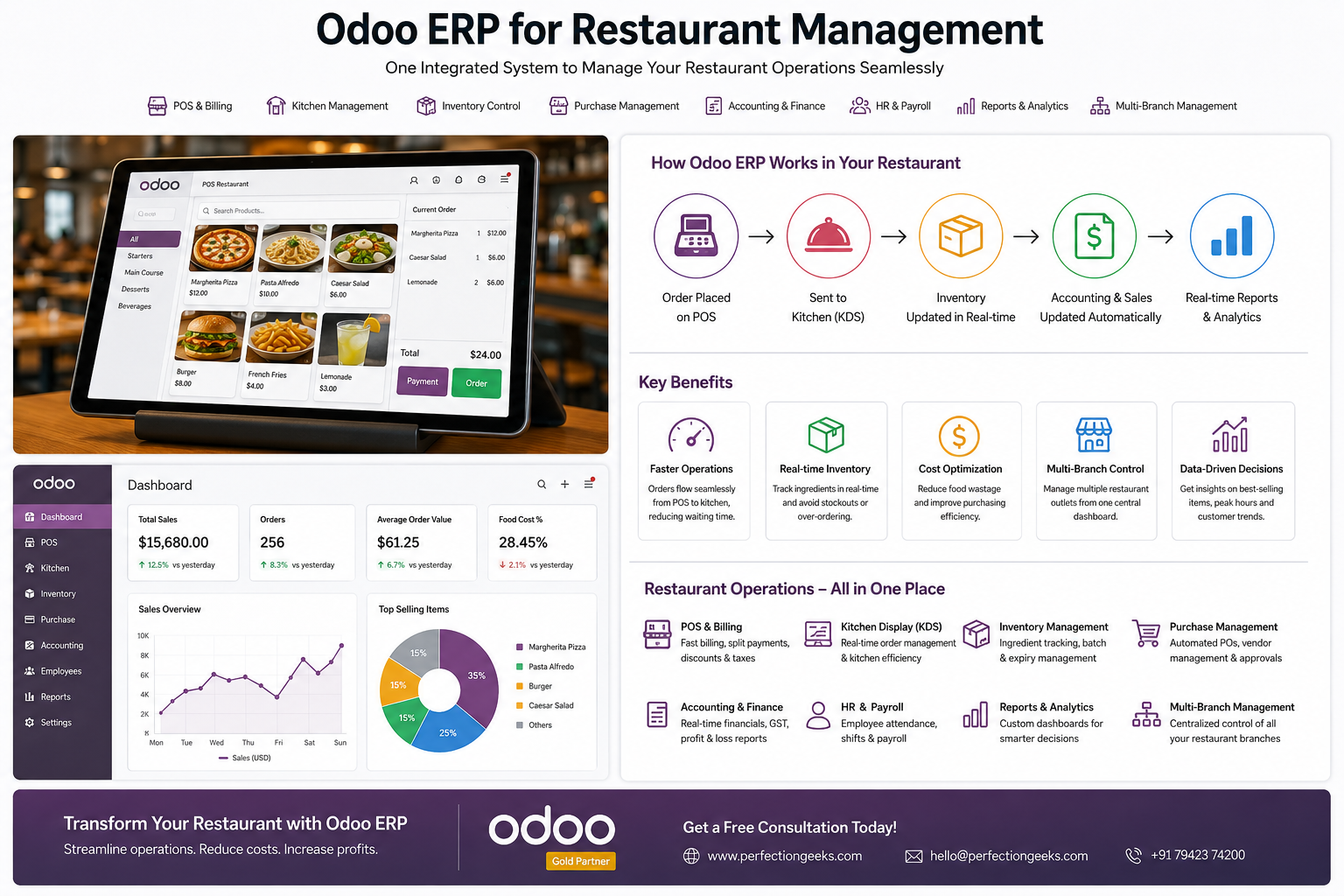
How Odoo ERP Works Across a Restaurant Operation
Understanding the ERP data flow is key to appreciating why Odoo ERP for restaurant management is fundamentally different from bolting together five separate apps. Here is how the ERP modules interact during a typical dinner service:
1. Pre-service: Purchasing & Inventory
Before service begins, the ERP's Purchase module checks stock levels against the day's reservation count and predicted covers (in Odoo 17, this is AI-assisted). If tomatoes are below the minimum threshold for tonight's menu, an automatic purchase order is raised to your approved supplier — no chef has to manually check the walk-in or call a vendor.
2. During service: POS + KDS Integration
A server takes an order on the POS tablet. The moment the order is confirmed, three things happen simultaneously within the Odoo ERP: the kitchen display receives the ticket, the inventory module deducts the recipe ingredients from stock, and the sale is recorded in the accounting ledger. No data entry. No duplication. All three are one atomic ERP transaction.
3. End of service: Cash Reconciliation & Reporting
At close, the cashier runs the end-of-day session in Odoo POS. The ERP automatically generates the daily journal entry, reconciles card payments against the bank statement, and produces the revenue report by payment method. The manager opens the ERP dashboard and sees today's food cost percentage, table turn rate, and labour cost ratio — all calculated from live data, without a single spreadsheet.
4. Month-end: Finance & Compliance
The Odoo Accounting module locks the period, generates GST/VAT returns from POS and purchase data, and produces a full P&L and balance sheet. What used to take an accountant 3–4 days now takes a few hours — because the ERP has been posting every transaction in real time all month.
Still running your restaurant on disconnected tools?
Our certified Odoo ERP consultants at PerfectionGeeks will audit your current stack and show you exactly what a unified ERP would save — free, no obligation.
Get Free ERP Audit
ERP vs Standalone POS — Why It Matters for Restaurants
Most restaurants start with a standalone POS and add tools as they grow — a separate inventory app, a payroll system, an accounting package. Within two years, data lives in five places, reconciliation takes hours each week, and the business owner has no single source of truth for profitability.
Odoo ERP for restaurant management solves this by design. Here is how ERP and a typical standalone POS stack compare across the functions that matter most to restaurant operators:
| Restaurant Function | ❌ Standalone POS / Fragmented Tools | ✅ Odoo ERP for Restaurant Management |
|---|---|---|
| Sales & Billing | Records sale, no downstream data flow | Sale triggers inventory deduction, revenue entry & kitchen ticket simultaneously |
| Inventory | Manual stock counts; no link to sales or recipes | Auto-deduction per sale using recipe BOMs; real-time stock alerts |
| Purchasing | Manual PO creation; no reorder automation | Auto-generated POs when stock hits reorder point; supplier price comparison |
| Food Costing | Calculated manually in spreadsheets (monthly, if at all) | Live food cost % per dish; margin alerts when ingredient costs spike |
| Staff & Payroll | Separate HR system; no link to scheduling or sales data | Shift scheduling, attendance, and payroll in one ERP; labour cost vs revenue |
| Accounting | Manual export from POS → accounting software each week | Every sale, purchase, and payroll entry posts to accounts in real time |
| Reporting | Siloed dashboards; no cross-department view | Unified P&L, food cost %, labour ratio, table turn — one dashboard |
| Multi-location | Separate systems per location; no consolidated view | Single Odoo ERP instance with multi-company / multi-branch consolidation |
Key Benefits & Use Cases by Restaurant Type
The best odoo erp for restaurant management delivers different high-value outcomes depending on the business format. Here is how different restaurant types use Odoo ERP:
| Restaurant Type | Primary ERP Modules | Top ERP Benefit |
|---|---|---|
| Quick Service / Fast Food | POS, Inventory, Loyalty | Faster throughput, automatic stock deduction, loyalty repeat visits |
| Full-Service Dining | POS (restaurant mode), KDS, HR, Accounting | Table turn optimisation, live food cost %, staff labour ratio |
| Cloud / Dark Kitchen | Inventory, Manufacturing (BOM), Purchase, Accounting | Recipe-level costing across multiple brands, centralised procurement |
| Hotel F&B Department | POS, Accounting (multi-department), Purchase, HR | Department cost allocation, internal billing, group event management |
| Multi-Location Chain | All modules + Multi-Company ERP | Consolidated P&L across all outlets, central purchasing, unified reporting |
| Café / Bakery | POS, Inventory (production), Accounting | Batch production planning, ingredient costing per item, daily cash close |
For odoo erp for restaurant management in India, the accounting module is particularly valuable — it handles GST multi-rate configurations (5%, 12%, 18% food categories), TDS on vendor payments, and India-specific payroll compliance out of the box in the Enterprise edition.
Step-by-Step Guide to Implementing Odoo ERP for Your Restaurant
Here is the ERP implementation roadmap used by PerfectionGeeks for restaurant clients across India, the UAE, and the UK:
1
ERP Discovery & Scoping (Week 1)Map your current tools, data flows, and pain points. Identify which Odoo ERP modules are required vs optional. Decide on Community vs Enterprise edition based on your multi-currency, reporting, and support needs. Produce a scoped budget forodoo erp restaurant management cost.
2
ERP Environment Setup (Week 1–2)Install Odoo on your chosen infrastructure (Odoo.sh cloud, AWS, or on-premise server). Configure company settings, operating currency, and tax rules for your jurisdiction. Set up chart of accounts aligned to restaurant-industry accounting standards.
3
Menu, Products & Recipe (BOM) Setup (Week 2–3)This is the most important ERP configuration step. Build every menu item as an Odoo product. Create a Bill of Materials (recipe) for each dish, specifying ingredient quantities. This is what enables the ERP to auto-deduct stock and calculate live food cost percentage — skipping this step breaks the entire inventory and costing chain.
4
POS Configuration & Floor Plan (Week 3)Build your restaurant floor plan in Odoo POS — tables, sections, capacity. Configure kitchen routing rules (which station receives which product category). Set up payment methods, split bill logic, and receipt/invoice templates. Connect KDS screens or kitchen printers.
5
Inventory, Suppliers & Purchasing (Week 3–4)Enter opening stock quantities and set reorder rules per ingredient. Add supplier records with pricelists. Configure automatic PO generation — so when any ingredient hits its minimum, Odoo ERP raises a draft purchase order to the preferred supplier without human intervention.
6
HR, Scheduling & Payroll (Week 4)Add staff records, define roles and contracts. Set up shift schedules and attendance tracking. Configure payroll rules for your jurisdiction (PF, ESI, TDS for India; PAYE for UK; WPS for UAE). Link HR cost centres to the Accounting module for labour cost reporting.
7
Staff Training & User Acceptance Testing (Week 5)Run structured training: 2 hours for floor staff on POS, 4 hours for managers on ERP dashboards and purchasing, 6 hours for the finance team on accounting and close procedures. Run UAT scenarios — take a full-service simulation through the ERP and verify every module responds correctly.
8
Go Live & ERP Hypercare (Week 6+)Run parallel operation for the first week — continue your old system alongside Odoo ERP and compare outputs daily. Your implementation partner (like PerfectionGeeks) should be on standby during the first two weeks of live service. After 30 days, conduct an ERP health check to fine-tune configurations.
Core Features of Odoo for Restaurant Management
Odoo has several features that make it perfect for restaurants. The most useful ones include:
POS System: Quick billing, easy order-taking, and multiple payment methods.
Inventory Tracking: Real-time updates on ingredients and supplies to avoid waste.
Finance Management: Automatic reports on sales, expenses, and profits.
Customer Management: Stores customer details for loyalty programs and promotions.
Staff Management: Handles shifts, attendance, and payroll.
Cloud Access: Lets owners track performance from anywhere.
Together, these Odoo ERP modules act as a complete Restaurant ERP software, covering both front-end service and back-end operations.
Common Mistakes to Avoid in Odoo Restaurant Management
Even the best odoo restaurant management company encounters implementation pitfalls. Here are the most common ones — and how to avoid them:
⚠ Common Mistakes
- Skipping the BOM setup: Without Bills of Materials, Odoo cannot auto-deduct stock. Many restaurants configure products without recipes, rendering the inventory module useless.
- Under-training staff: A 30-minute demo is not sufficient. Budget at least 2–3 days of structured training before go-live, or you'll face resistance and workarounds.
- Choosing Community when you need Enterprise: Community lacks multi-currency, advanced reporting, and dedicated support. Assess your requirements honestly before choosing edition.
- Ignoring tax configuration: GST, VAT, and service charge rules vary by country and restaurant type. Incorrect tax setup can cause major reconciliation issues.
- Going live without a backup plan: Hardware failures happen. Always have an offline POS fallback (Odoo's offline mode) configured and tested before the first service.
Expert Tips for Odoo ERP Restaurant Management in 2026
- After delivering 200+ Odoo ERP projects since 2014, here are the practices that consistently produce the strongest ROI for restaurant clients in 2026:
✅ PerfectionGeeks Expert Tips — 2026
- Enable Odoo 17's AI demand forecasting (Enterprise) to predict ingredient requirements based on historical sales patterns, day-of-week trends, and seasonal peaks. This alone can reduce over-ordering waste by 20–30%.
- Use the Manufacturing module for prep planning — not just for factories. Cloud kitchens and high-volume restaurants use Odoo's production orders to generate daily ingredient prep sheets tied directly to reservation and forecasted cover counts.
- Integrate WhatsApp Business API via Odoo Discuss — now natively available in Odoo 17 — to send automated reservation confirmations, order status updates, and loyalty reward notifications without a third-party tool.
- Set up a "theoretical vs actual" food cost variance report in Odoo. This compares what ingredients should have been used (per BOM) against what was actually consumed (per stock movements). A consistent variance above 3% signals theft, portion inconsistency, or recipe non-compliance.
- For multi-location chains: Use Odoo's Multi-Company ERP with a central procurement entity. All outlets raise internal purchase requests; the central entity negotiates bulk supplier contracts. This typically reduces procurement cost by 8–15%.
- Build a "manager dashboard" in Odoo Studio with five daily KPIs visible at login: covers served, food cost %, labour cost %, average transaction value, and stock alerts. Takes 2 hours to build; saves the manager 30 minutes of reporting every single day.
Odoo ERP for Restaurant Management Cost in 2026
- A realistic breakdown of odoo erp restaurant management cost for a typical restaurant implementation:
Cost Component Community Edition Enterprise Edition Licence Fee Free (open-source) ~$24.90/user/month (annual) Cloud Hosting VPS self-hosted ($20–80/mo) Odoo.sh from $79/mo ERP Implementation $2,000–$8,000 $5,000–$25,000+ Custom Module Development $500–$5,000 per module $500–$5,000 per module Data Migration $500–$2,000 $500–$3,000 Annual Support & Maintenance Community forums (free) $1,200–$5,000/year For a single-location restaurant, the total first-year cost of a complete Odoo ERP for restaurant management implementation typically falls between $4,000 and $18,000. Compared to enterprise restaurant ERP platforms from Oracle or SAP — which start at $50,000+ — Odoo delivers comparable functionality at a fraction of the cost, with full source-code access and no vendor lock-in.
Unified Restaurant Operations with Odoo ERP
One of the biggest strengths of Odoo is unifying all operations. Orders taken at the counter or table are directly linked to the kitchen. At the same time, the system updates stock levels and records the transaction for accounts. This kind of smooth workflow ensures fewer mistakes and faster service. For restaurants that want both speed and accuracy, Restaurant management ERP like Odoo is a perfect solution.
Smarter Financial Management
Keeping track of finances is a challenge for most restaurants. With Odoo, owners get automatic reports of daily sales, expenses, and profits. Vendor payments and salaries can also be managed in the same system. Since Odoo ERP open source can be customized, restaurants can create reports that match their exact needs. This makes financial planning simpler and helps owners make better business decisions.
Easy Integration with Cloud Systems
Many restaurants prefer a Cloud-based restaurant ERP for flexibility. Odoo supports cloud integration, which means owners can check sales, stock, or staff activity even when they are not at the restaurant. This feature is especially useful for restaurants with more than one branch. It keeps all outlets connected and ensures operations run the same way everywhere.
Role of Odoo ERP Consultants
Setting up Odoo requires proper planning. An Odoo ERP consultant helps restaurants choose the right modules, customize them, and train the staff. This ensures smooth Odoo ERP implementation. Companies like PerfectionGeeks are experienced in Odoo setup and support. They help restaurants use the system effectively and make sure it grows with the business.
Ready to Implement Odoo ERP for Your Restaurant?Talk to a certified Odoo ERP consultant from PerfectionGeeks. We map the right ERP modules to your restaurant type, estimate your implementation cost honestly, and deliver on time. 200+ projects since 2014. Free consultation — no commitment required. |
Frequently Asked Questions
Quick answers related to this article from PerfectionGeeks.
1. What is Odoo ERP for restaurant management ?
2. Why should restirant use erp Instead of standalone POS?
3. Which odoo erp module does a erp need?
4. Can Odoo manage multiple restaurant branches?
5. Is Odoo suitable for small restaurants and cafes?
Conclusion
Restaurants today need tools that make their work simple and efficient. Odoo does exactly that. From order taking in the modern restaurant kitchen to managing accounts and improving customer service, Odoo handles it all. By choosing the right partner like PerfectionGeeks for Odoo ERP solutions, restaurants can boost efficiency, cut costs, and deliver better experiences to their customers. In short, Odoo is the complete Restaurant ERP software that every restaurant needs for growth and success.

Written By Shrey Bhardwaj
Director & Founder
Shrey Bhardwaj is the Director & Founder of PerfectionGeeks Technologies, bringing extensive experience in software development and digital innovation. His expertise spans mobile app development, custom software solutions, UI/UX design, and emerging technologies such as Artificial Intelligence and Blockchain. Known for delivering scalable, secure, and high-performance digital products, Shrey helps startups and enterprises achieve sustainable growth. His strategic leadership and client-centric approach empower businesses to streamline operations, enhance user experience, and maximize long-term ROI through technology-driven solutions.


