Published 17 February 2026 | Updated 21 May 2026
Technology
7 Procore Alternatives for Enterprise Construction With Integrated Financials
Procore’s field tools impress, but the cost about $10 000 upfront and $20 000–$50 000 a year for the full suite makes many enterprise builders wonder if they’re paying for features they rarely use. This guide compares seven platforms that close Procore’s two biggest gaps: native cost governance and smooth ERP connections. For leaders steering multimillion-dollar programs, we outline what each tool does best, where it falls short, and what it truly costs—so you can choose software that protects your margin instead of draining it.
|
Best Procore Alternatives for Enterprise Construction Management
Construction companies are increasingly exploring Procore alternatives to find software platforms that better match their operational requirements, scalability goals, pricing expectations, and customization needs. While Procore is a widely recognized construction management solution, many businesses look for alternative platforms offering enhanced flexibility, industry-specific features, and enterprise-level integrations.
The best Procore alternatives provide:
- Construction project management
- Budget and cost tracking
- Real-time collaboration
- Workforce management
- Document management
- Field operations tracking
- Cloud-based accessibility
- AI-powered reporting and analytics
Popular Procore alternatives include:
- Buildertrend
- Autodesk Construction Cloud
- Oracle Aconex
- Fieldwire
- Contractor Foreman
- CoConstruct
- Custom enterprise construction platforms
Many enterprises also prefer custom construction management software solutions tailored specifically to their workflows, reporting systems, and operational processes. Custom platforms provide better scalability, stronger integration capabilities, and advanced security compared to generic SaaS solutions.
Modern enterprise construction software focuses heavily on:
- Cloud integration
- Mobile accessibility
- Real-time reporting
- AI-powered analytics
- Workflow automation
- Compliance tracking
Choosing the right Procore alternative depends on:
- Company size
- Budget
- Construction workflows
- Integration requirements
- Customization needs
- Scalability goals
Why Businesses Look for Procore Alternatives
Many construction companies explore Procore alternatives due to pricing concerns, customization limitations, integration requirements, and enterprise scalability needs.
Cost Optimization
Some organizations prefer more cost-effective solutions for growing teams and projects.
Better Customization
Custom enterprise platforms provide industry-specific workflows and advanced reporting features.
Advanced Integrations
Businesses require seamless integration with ERP, CRM, accounting, and workforce management systems.
Improved Scalability
Large enterprises need scalable systems capable of handling complex construction operations.
Mobile & Cloud Accessibility
Modern construction teams require cloud-based and mobile-friendly project management tools.
How we sized up the market
We started where any construction leader would: Google. The first 20 organic results for searches such as “Procore alternatives with accounting” and “enterprise construction project controls” produced more than 20 vendors and a snapshot of the dominant talking points.
We left the marketing pages behind and combed through eight community forums, from Reddit’s r/ConstructionTech to LinkedIn project-controls groups. Threads surfaced three common gripes: Procore strains budgets, cost forecasts stay trapped in Excel, and field teams resist ERP-style screens. Those comments shaped every demo question.
Next, we pored over press releases and analyst notes from the past 12 months, looking for clear momentum: funding rounds, big-name wins, and headline features such as AI cost prediction. Only products with fresh development and enterprise references made the shortlist.
Finally, we scored each candidate on six business-critical factors: depth of integrated financials, scalability, schedule-to-field handoff, integration ease, total cost of ownership, and user sentiment. The weighted matrix surfaced clear leaders while quietly dropping the hype.
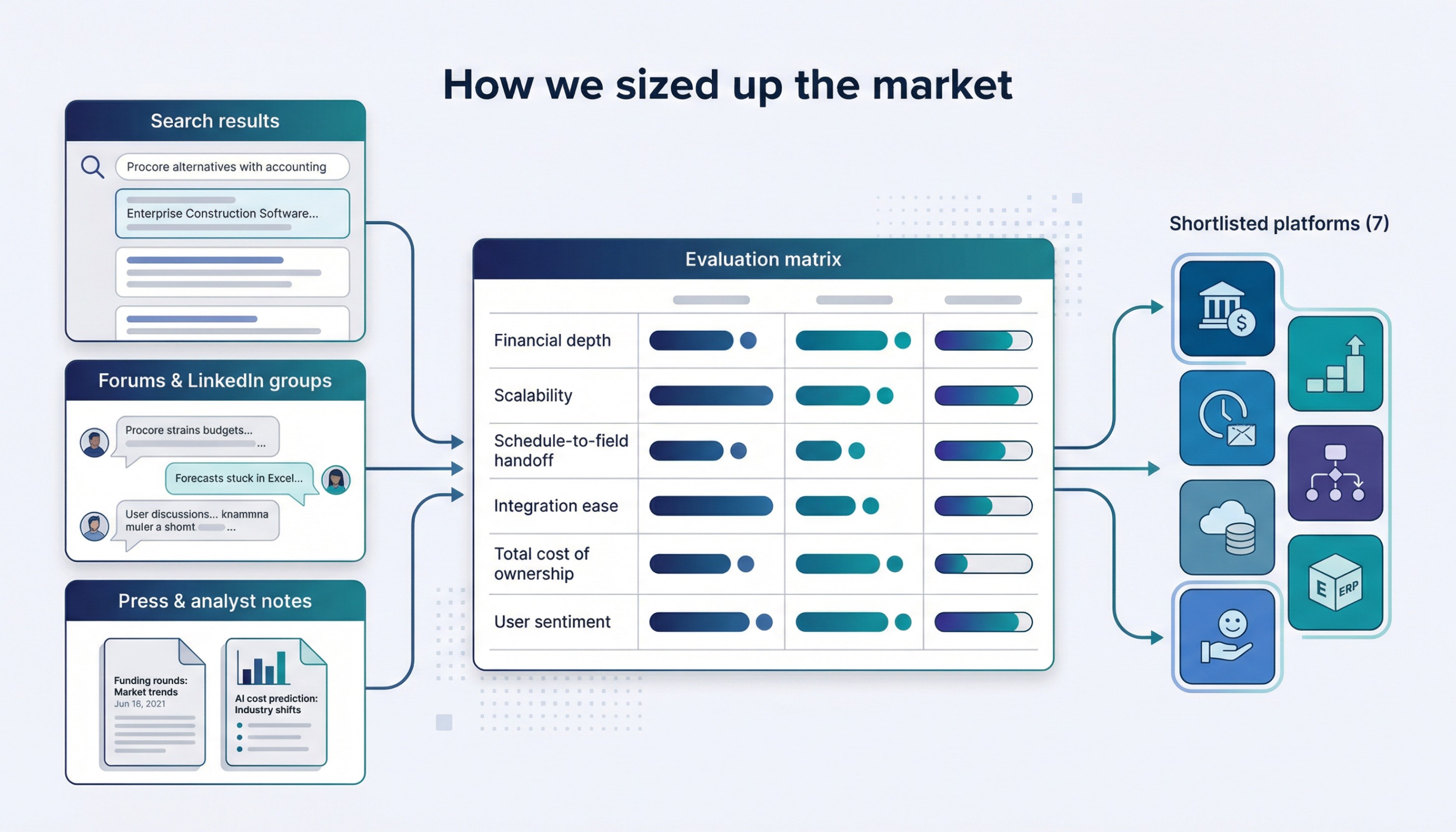
That process left seven serious platforms—the ones you’ll meet in the next section.
Quick comparison: seven platforms at a glance
Before we dive into the full reviews, it helps to see everything on one page. Scan the grid below and you’ll spot the clear personality of each platform: who it serves, what it does best, and how it is delivered.
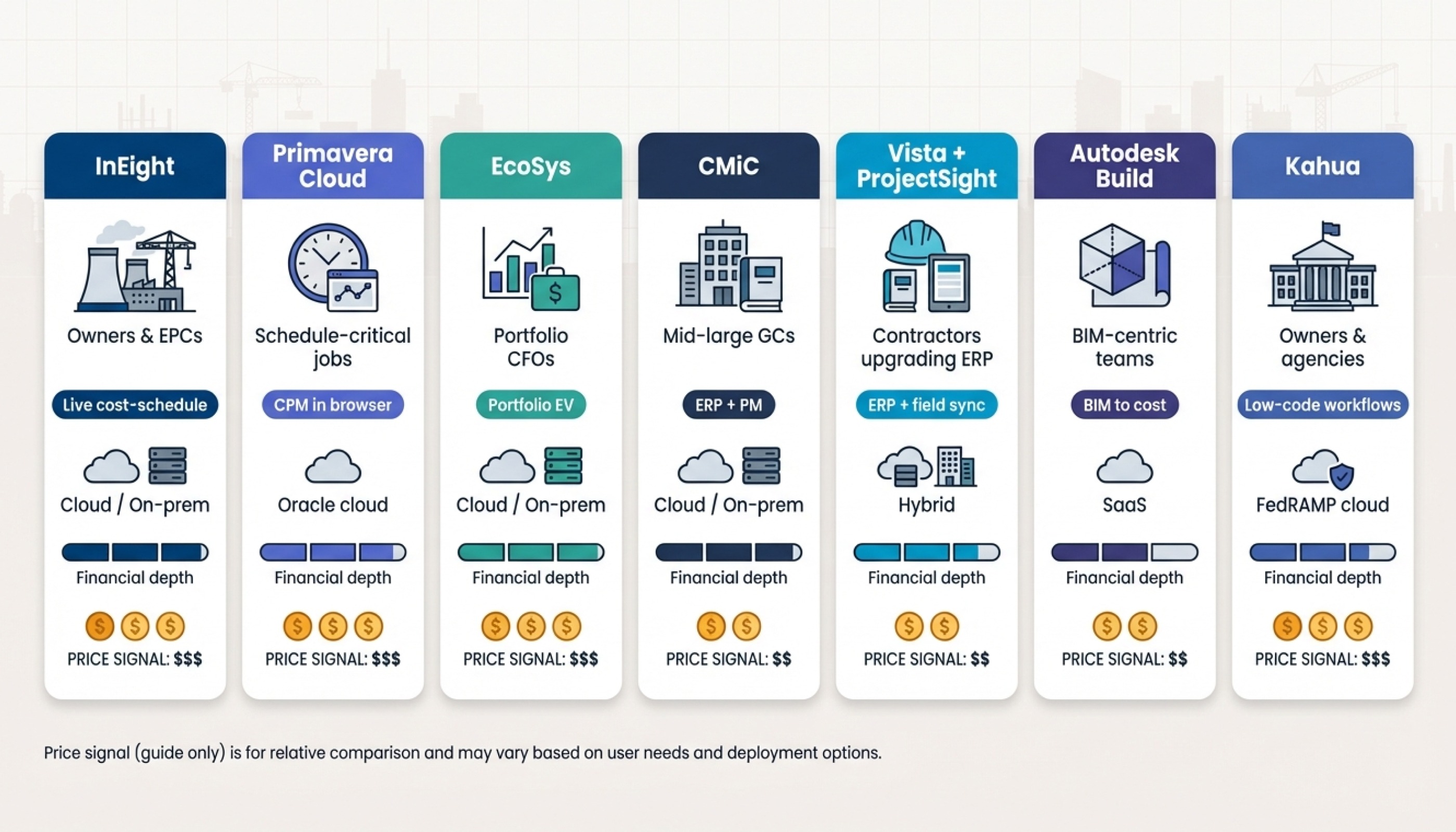
| Platform | Shines for | Stand-out edge | Deployment | Financial depth | Price signal* |
| InEight | Owners, EPCs | Live cost-schedule link plus AI forecasting | Cloud or on-prem | Full project controls | Six-figure enterprise |
| Oracle Primavera Cloud | Schedule-critical megaprojects | P6-grade CPM in a browser | Oracle cloud | Robust, configurable | Quote-only, high training cost |
| Hexagon EcoSys | Portfolio CFOs | Portfolio-level earned value | Cloud or on-prem | Capital budgeting & EV | Enterprise subscription |
| CMiC | Mid-large GCs | Accounting + PM in one DB | Cloud or on-prem | Full ERP suite | Often cheaper than Procore |
| Viewpoint Vista + ProjectSight | Contractors upgrading ERP | Proven Vista finance, modern field UI | Hybrid cloud | ERP + synced PM | Bundle pricing |
| Autodesk Build (ACC) | BIM-centric teams | Native model-to-cost link | SaaS | Solid cost module, no GL | Tiered per-user |
| Kahua | Owners & agencies | Low-code workflow builder | FedRAMP cloud | Flexible cost & funding | Enterprise subscription |
*Ballpark guidance only; vendors quote case by case.
Use this table as a cheat sheet. Find the column that matches your biggest pain point, whether that is earned value, BIM coordination, or an all-in-one ERP, and jump to the matching deep dive.
InEight: live cost control for mega-projects
If you build billion-dollar plants or rail lines, you care less about flashy punch-list screens and more about knowing, today, whether concrete crews are burning cash quicker than planned. That focus is where InEight excels.
InEight's integrated, modular platform, highlighted on ineight.com, unifies scope, cost, and schedule in one workspace. Update a daily quantity in the field app, and the budget, forecast, and critical path refresh almost instantly. Finance stops waiting a week for spreadsheets, and project managers spot overruns before they grow.
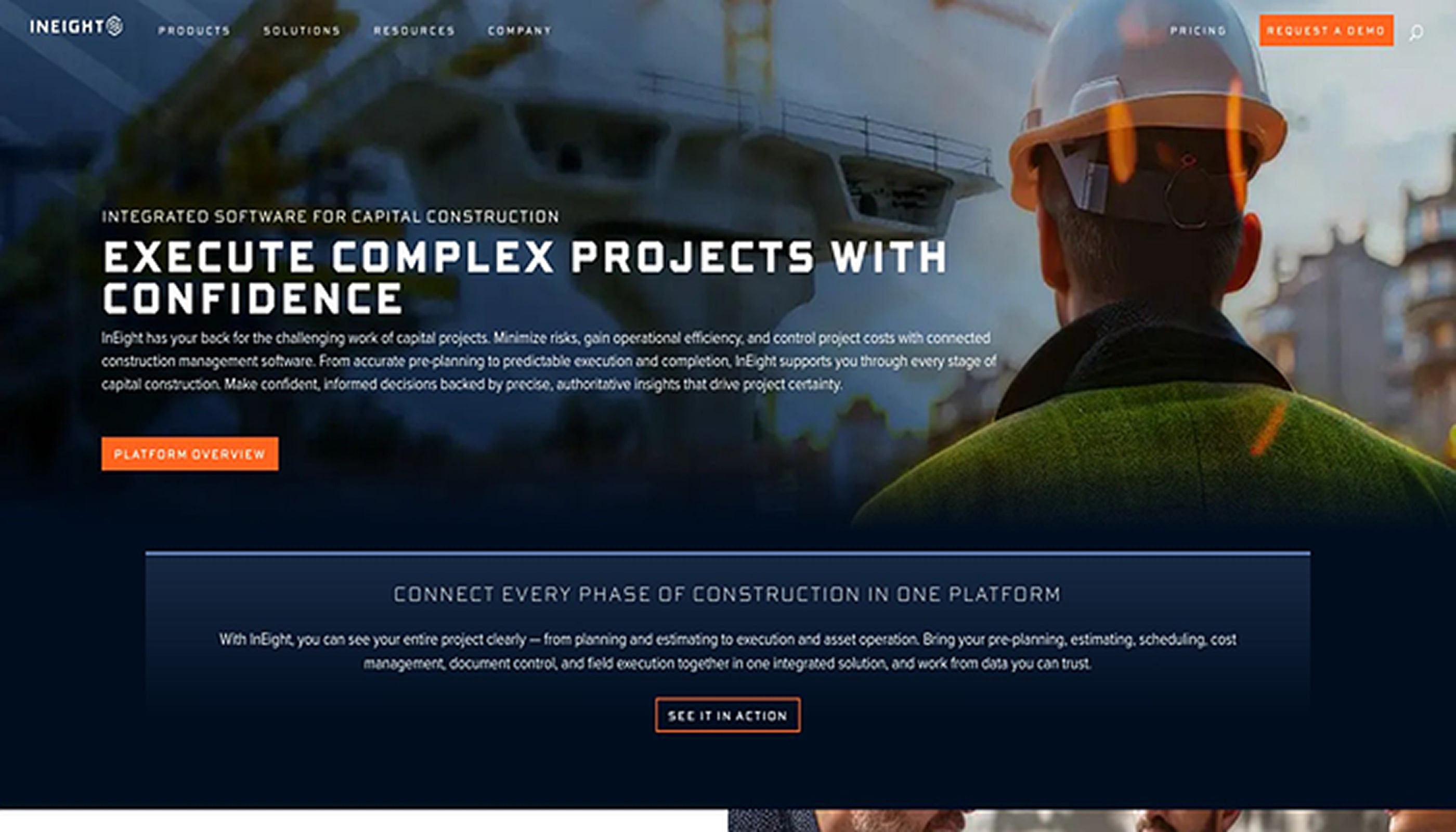
InEight enterprise construction cost control platform website screenshot
In late 2025, InEight expanded its real-time promise with Intelligence dashboards. New AI models study historic performance patterns and flag looming cost or schedule drift weeks in advance, giving you time to resequence work or renegotiate packages.
Deployment is flexible: choose cloud for speed or on-prem for strict IT policies. Most enterprises phase in the cost module first, then add field tracking once the data model is stable. Plan on four to eight months of configuration and training, a timeline that feels reasonable when you consider the six-figure budgets the software protects.
InEight is not cheap, yet owners and EPC giants keep buying because early warnings often prevent seven-figure overruns. If your finance team lives in SAP and your superintendents live on tablets, InEight is the rare middle layer they will both trust.
Oracle Primavera Cloud: schedule control with enterprise-grade cost governance
When deadlines carry liquidated damages, schedule control becomes critical. Primavera has served that need for decades, and the cloud version retains P6 critical-path logic while shedding the old desktop feel.
Open a browser and you still get P6 horsepower: tens of thousands of activities, what-if scenarios, and resource leveling across an entire program. The difference is collaboration. Planners, cost engineers, and field supers share the same live schedule instead of emailing xer files.
Cost is not an afterthought. Pair Primavera Cloud with Oracle Unifier to gain rigid budget governance, commitment tracking, and audit-tight change approvals. Finance teams value the traceability; project teams appreciate that approvals route automatically instead of disappearing in inbox limbo.
Implementation takes work. Primavera can model almost any workflow, a gift and a curse. Without a clear playbook you can drown in configuration choices. Most owners assign a dedicated Primavera administrator and lean on an Oracle partner for the first six months.
Licensing falls into enterprise-software territory with per-user subscriptions plus training. When on-time completion avoids daily penalty fees, though, schedule certainty pays for itself. If your mantra is “no slip, no surprise,” Primavera remains a safe bet in construction tech.
Hexagon EcoSys: discipline for portfolio dollars
Spreadsheets fail once you manage dozens of concurrent projects. EcoSys replaces that chaos with a single cost ledger that stretches from capital plans to individual line-item variances.
Lock a budget, and every purchase order, time sheet, and schedule update flows into the same data model. The result is a live CPI and SPI for each job, plus a roll-up view the CFO can cite on earnings calls.
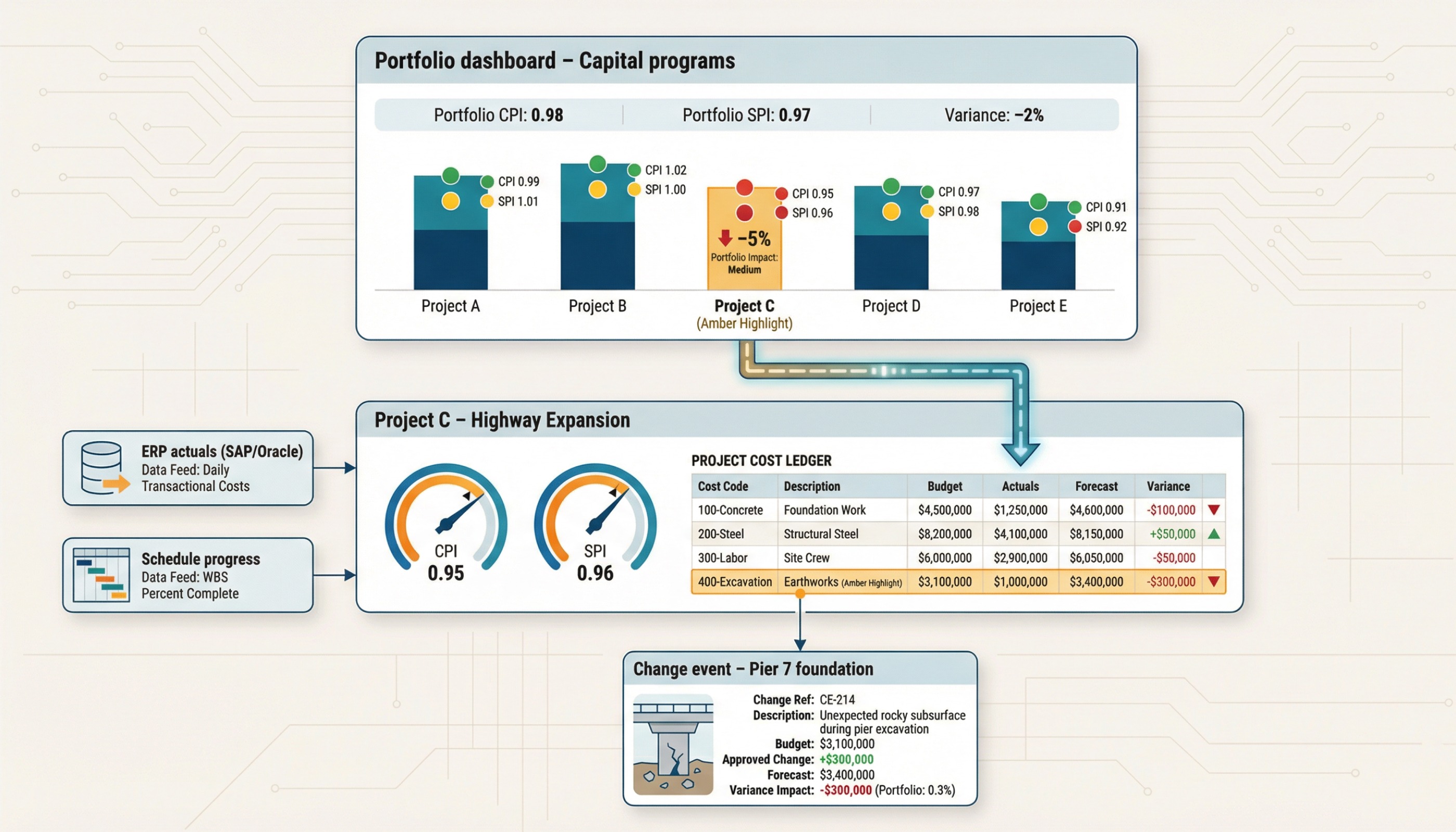
Because EcoSys pulls actuals from ERP systems and progress from scheduling tools, finance stops re-keying numbers and controllers trust the math. The trade-off is setup effort. You will spend months defining cost codes, funding sources, and gate approvals before the first dashboard appears. Skip that work, and EcoSys turns into a prettier spreadsheet.
The interface leans utilitarian, with functional grids instead of flashy tiles, yet power users value the drill-down speed. When a two percent variance shows at portfolio level, executives click twice to trace it back to a single change event on a single bridge pier. That traceability keeps asset owners, utilities, and public agencies renewing multi-year subscriptions.
If you need tight, standardized reporting, EcoSys keeps every project on the same course.
CMiC: one database, zero double entry
Procore keeps field crews happy but leaves accountants juggling exports. CMiC takes the opposite approach. It began as a construction accounting engine, then added project-management modules so cost and collaboration share the same ledger.
Approve a subcontract change and the job cost updates before finance pours a first coffee. Payroll, AP, AR, equipment, and HR all speak the same language, so month-end closes faster and WIP reports no longer rely on reconciled CSVs.
The catch is culture. CMiC screens feel more like ERP forms than consumer apps. Superintendents who grew up on iPhone gestures will need guidance, and a dedicated system admin is essential. Companies that invest in training often report a quieter back office and fewer “why doesn’t accounting have our numbers?” Slack pings.
Licensing is modular and, for many mid- to large GCs, costs less than paying for both Procore and a separate ERP. Remember, you’re not buying an app; you’re adopting a core system. Treat implementation like any enterprise change: plan the chart of accounts, clean old cost codes, and launch with an internal champion. Do that and CMiC delivers one source of truth strong enough to retire half a dozen disconnected tools.
Viewpoint Vista + ProjectSight: modern field eyes on a rock-solid ledger
Thousands of contractors already trust Vista for job cost and payroll, but its Windows-era interface slows field adoption. Trimble’s answer is ProjectSight, a cloud project-management layer that syncs directly with Vista’s database.
Picture a coordinated pair. Vista manages WIP, union payroll, and financial compliance, while ProjectSight gives supers a touch-friendly app for drawings, RFIs, and daily reports. Approve a change order on an iPad and Vista updates contract value immediately. No imports, no lag—everyone sees the same number.
Rollout is gradual. Firms often start by hosting Vista in Trimble’s cloud to drop server upkeep, then pilot ProjectSight on one job. Once crews like the cleaner UI, scaling only requires more licenses.
Total cost sits between a Procore-plus-ERP stack and an all-in-one such as CMiC. If you already pay Vista maintenance, adding ProjectSight typically raises software spend by less than 20 percent while eliminating shadow apps in the field.
Vista’s desktop screens still look dated, yet pairing them with ProjectSight lets finance keep the ledger they trust and gives operations the interface they need. For contractors who prefer to keep a proven ERP but crave a better field experience, this hybrid often feels just right.
Autodesk Build: where BIM meets the budget
When your teams spend the week in Revit, forcing them into a siloed project-management tool kills momentum. Autodesk Build keeps design, coordination, and cost in the same workspace, so a clash you spot in the 3D model can spark a budget chat before concrete is poured.
Open a drawing, tap a wall, and you see quantities, linked cost items, and any pending change events. Field crews raise an RFI on their phone, designers respond inside the model, and cost managers watch the budget line update instead of waiting for a Friday spreadsheet.
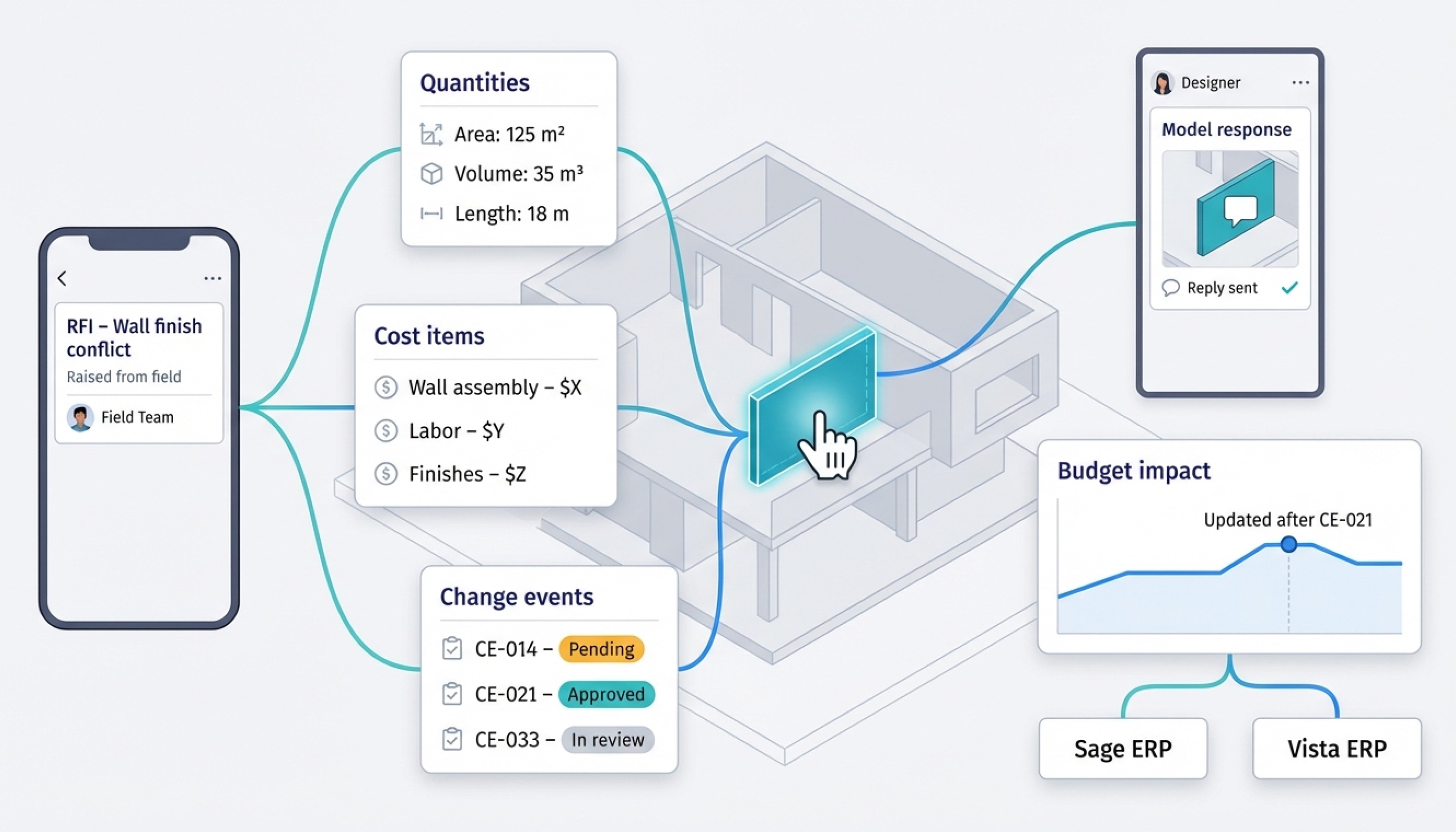
Because Build runs on Autodesk Construction Cloud, integration comes standard. Design files flow from Revit or Navisworks without exports, and data connects outward to ERPs such as Sage or Vista. The cost module tracks budgets, commitments, and change orders, then leaves general-ledger work to finance systems built for it.
Adoption is quick. Crews familiar with PlanGrid or BIM 360 feel at home, and the mobile app works offline on remote sites. Pricing follows a per-user model with volume discounts; many firms report spending 10–20 percent less than comparable Procore setups when heavy BIM features but modest seat counts are needed.
For design-build contractors and owners who value coordinated models as much as finished slabs, Autodesk Build turns “BIM integration” from a promise into daily practice.
Kahua: flexible workflows for owners and agencies
Project-management systems often stumble not from missing features but from forcing every team into the same rigid mold. Kahua flips that problem. It ships with solid out-of-the-box apps such as RFIs, pay apps, and funding logs, yet lets administrators reshape each form, field, and approval path without coding.
That flexibility convinced the U.S. Army Corps of Engineers in 2025 to modernize construction oversight across its nationwide districts. The agency needed one platform that could enforce federal security rules, route complex funding approvals, and still adapt to dam projects one day and military housing the next. Kahua’s low-code builder checked all three boxes.
Owners praise the funding engine. You can map multiple capital sources—bonds, grants, internal budgets—to the same contract and track every change order’s impact on each pot of money. Auditors get clean lineage, and project teams gain real-time clarity on remaining funds.
Power brings a governance challenge. If every project designs its own workflow, chaos returns. Successful clients appoint a “Kahua lead” to curate templates and keep consistency. With that guardrail, teams enjoy a system that feels purpose-built for them.
Decision guide: matching tools to real-world needs
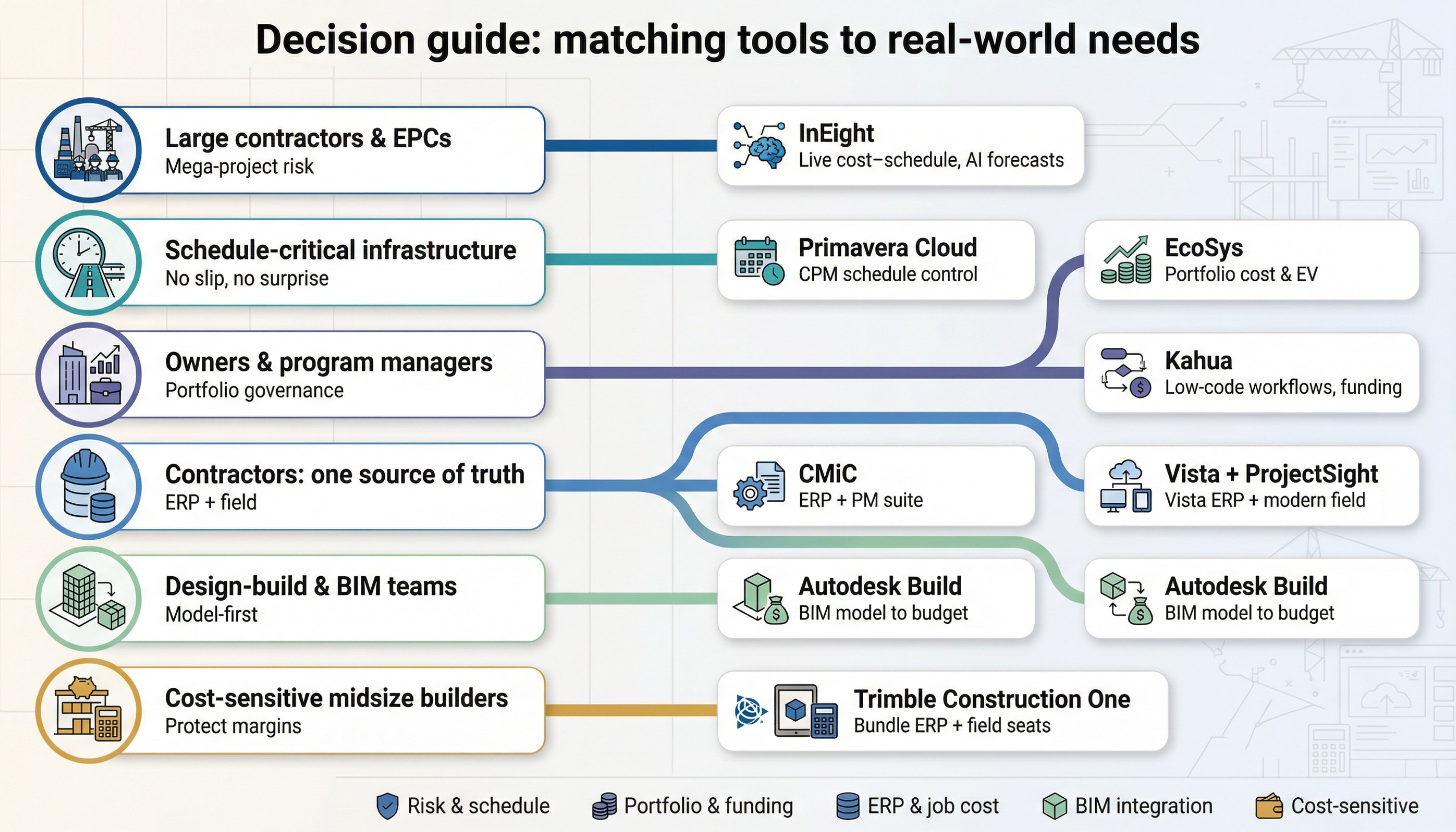
Large contractors and EPCs: own your risk with InEight
If you build airports, LNG terminals, or six-lane interstates, a single hiccup can torch profit. InEight’s live link between field progress, cost, and schedule lets project-controls teams spot a concrete-pour slip before it becomes a claim. AI forecasts flag overruns weeks in advance, giving you time to resequence crews instead of writing change-order apologies. Yes, licenses are pricey, but the first avoided seven-figure overrun erases sticker shock. If your CFO watches earned-value curves at night, start here.
Schedule-critical infrastructure: lock the timeline with Oracle Primavera Cloud
High-profile highway and rail jobs cannot slip. Primavera Cloud keeps CPM horsepower in a browser so planners, cost engineers, and field supers share one schedule in real time. Add Oracle Unifier for strict budget governance and change approvals that never vanish in inbox limbo. A dedicated admin plus six months of partner coaching set you up, but on-time delivery saves daily liquidated damages that dwarf subscription fees.
Owners and program managers: standardize cost governance with EcoSys or flex with Kahua
EcoSys enforces one cost breakdown across every project, giving finance a live CPI for the whole portfolio. Choose it when consistency outranks flexibility. Kahua suits universities, hospital systems, and agencies that juggle mixed funding sources and unique workflows. Its low-code builder adapts each form while a platform steward keeps templates tidy.
Contractors chasing one source of truth: pick CMiC for all-in-one or modernize Vista with ProjectSight
CMiC merges job cost, payroll, AP, and field data in one Oracle database. The payoff is a faster month-end close and fewer “where are the numbers?” chats—if you invest in training. Vista users who want a lighter lift can bolt ProjectSight onto the existing ledger. Field crews get a touch-friendly app, finance keeps the system they trust, and change orders sync without CSV grief.
Design-build and BIM-centric teams: keep models and money in the same room with Autodesk Build
Autodesk Build lets designers, estimators, and supers work inside the same 3D context. Tap a wall in the model, and linked cost lines appear instantly. RFIs, quantity takeoffs, and budget impacts stay in one cloud, then flow to ERPs such as Sage or Vista. Teams already fluent in PlanGrid adopt it in days.
Cost-sensitive midsize builders: trim spend without dumbing down
Trimble Construction One bundles Vista finance seats with lower-cost ProjectSight field seats, often cutting software spend by 15–25 percent versus Procore plus a separate ERP. Small teams can also start on Autodesk Build’s Essentials plan, then add features as project size grows. Both paths protect margins while preserving professional job costing.
Key Features of Modern Construction Management Software
Modern enterprise construction platforms include features such as:
- Project scheduling
- Budget tracking
- Workforce management
- Real-time collaboration
- Mobile accessibility
- Cloud-based document management
- AI-powered analytics
- Compliance monitoring
- Equipment tracking
- Reporting dashboards
These features help construction companies improve operational efficiency and project visibility.
Building Something Similar?PerfectionGeeks Technologies has delivered 200+ enterprise software solutions since 2014, including custom construction management platforms, cloud-integrated enterprise systems, and AI-powered workflow automation tools. 👉 Contact our experts today to build scalable construction management software tailored to your business needs.
|
Why Enterprises Choose Custom Construction Software
Many enterprises prefer custom construction management software instead of traditional SaaS platforms because custom systems provide:
- Tailored workflows
- Better scalability
- Enhanced security
- Enterprise integrations
- Advanced analytics
- Industry-specific functionality
Custom construction platforms can integrate with:
- ERP systems
- Accounting software
- Workforce management tools
- IoT devices
- AI analytics platforms
This flexibility helps enterprises optimize operations and improve project management efficiency.
Construction Software Industry Statistics
- Construction companies increasingly invest in cloud-based project management platforms to improve operational efficiency.
- Enterprise construction software helps organizations improve collaboration, budgeting, and project visibility.
- AI-powered analytics and workflow automation continue to transform construction technology platforms.
These trends highlight the growing demand for advanced construction management software solutions.
Frequently Asked Questions
Quick answers related to this article from PerfectionGeeks.
1. What are the best Procore alternatives?
2. Why do businesses use Procore alternatives?
3. What features should construction management software include?
4. Can enterprises build custom construction management software?
5. Should we switch mid-project or wait for new jobs?
Conclusion
Selecting the right alternative depends on your project scale, risk tolerance, and existing financial systems. Use the comparisons above to focus vendor demos, reference checks, and cost analyses so your next platform guards profit instead of draining it.

Written By Shrey Bhardwaj
Director & Founder
Shrey Bhardwaj is the Director & Founder of PerfectionGeeks Technologies, bringing extensive experience in software development and digital innovation. His expertise spans mobile app development, custom software solutions, UI/UX design, and emerging technologies such as Artificial Intelligence and Blockchain. Known for delivering scalable, secure, and high-performance digital products, Shrey helps startups and enterprises achieve sustainable growth. His strategic leadership and client-centric approach empower businesses to streamline operations, enhance user experience, and maximize long-term ROI through technology-driven solutions.