
Published 18 May 2026 | Updated 29 May 2026
technology
REACT SERVER COMPONENTS 2026: THE COMPLETE GUIDE
If you've been building React apps for a while, you already know the headaches: slow page loads, JavaScript bundles that balloon out of control, awkward data-fetching patterns, and SEO challenges that feel like they were bolted on as an afterthought. React Server Components — first introduced as an experiment and now a production-ready cornerstone of modern React web development — solve these problems at the architecture level. This guide breaks down exactly what they are, how they work, and why they matter so much in 2026.
Transform Your Digital Experience
React Server Components (RSC) are React components that execute exclusively on the server and send only their rendered output to the browser — no component JavaScript is shipped to the client. In 2026, RSC is the production-standard architecture for React applications, embedded as the default in Next.js App Router, delivering 30–50% smaller JavaScript bundles, built-in SEO, direct database access, and streaming rendering out of the box.
1. Zero JavaScript to the browser for server components Every React Server Component you write ships 0 KB of JavaScript to the user's device. Only the rendered output arrives — the component code stays on the server entirely. In large apps this reduces total JavaScript bundle size by 30–50%, directly improving Time to Interactive and Core Web Vitals scores.
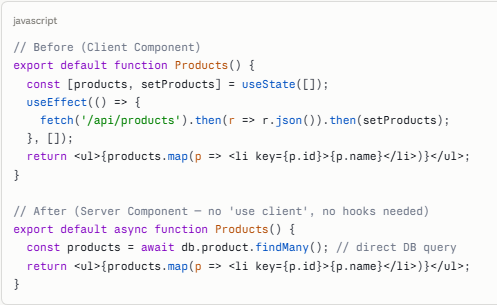
2. Data fetching becomes a single async/await call RSC eliminates the useEffect + useState + loading-state pattern for server-fetched data. You write a plain async function at the top of your component, query your database or API directly, and return JSX. No hooks. No race conditions. No separate API route needed for internal data.
3. RSC is fundamentally different from SSR — understand why it matters Server-Side Rendering (SSR) still sends JavaScript to the browser for hydration. RSC components send only the serialized output — the component's JavaScript never reaches the browser. This is why RSC reduces bundle size while SSR alone does not.
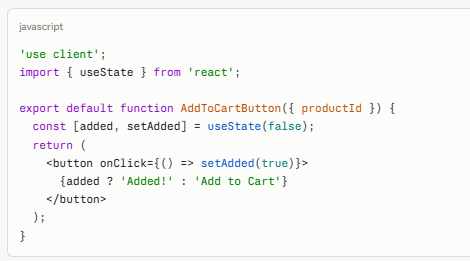
4. Client Components remain essential — use them precisely useState, useEffect, event handlers (onClick, onChange), and browser APIs (window, localStorage) all require Client Components marked with 'use client'. The goal is not to eliminate Client Components — it's to use them only where interactivity is genuinely needed.
5. Next.js App Router makes RSC the safe default Every component inside the app/ directory in Next.js 13+ is a Server Component by default. Developers must actively opt into client-side code, not server-side code. This reversal of defaults naturally produces better-performing applications with less effort.
6. SEO improves structurally, not just tactically Because RSC renders on the server, search engines receive fully populated HTML in the first HTTP response — no JavaScript execution required for content indexing. Pages built with RSC rank more consistently for content-heavy queries compared to pure client-rendered React apps.
7. Security is architectural, not bolted on Database connection strings, API keys, and sensitive business logic live inside Server Components and never leave the server environment. There is no mechanism for them to be accidentally exposed in a browser bundle because Server Component code is never included in the bundle.
What is React Server Components 2026?
React Server Components (RSC) are a type of React component that runs exclusively on the server — not in the browser. When a user visits a page, these components execute on the server, generate their output, and send that finished result to the client as a serialized React component tree. The browser never receives the JavaScript code for these components at all.
The formal definition from the React team: Server Components are async functions that can access server-side resources (databases, filesystems, environment variables) and return JSX. They are never hydrated on the client and never re-render in the browser. They are rendered once on the server per request (or cached), and the output is streamed to the browser.
Key distinction: React Server Components ≠ Server-Side Rendering (SSR). SSR still sends JavaScript to the browser for hydration. RSC components send only the rendered output — their JavaScript code stays on the server entirely. This is what makes RSC uniquely effective at reducing bundle size.
RSC was stabilized in the React 18 release and adopted as the primary architecture in Next.js 13's App Router. By 2026, it is considered the standard approach for production React applications targeting performance, SEO, and scalability.
Why React Server Components Matter in 2026
The web performance stakes have never been higher. According to Google's Core Web Vitals data, pages with LCP above 2.5 seconds experience measurably lower conversion rates and ranking penalties. JavaScript bundle bloat is the leading cause of slow LCP on React applications. RSC directly addresses this at the architecture level.
📊 Industry Stats (2025–2026)
- According to the 2025 State of JavaScript survey, Next.js App Router (which uses RSC by default) is now the most commonly used React framework setup, surpassing Pages Router for the first time.
- HTTP Archive data shows that the median React single-page application ships 400–600 KB of JavaScript to the browser. Teams adopting RSC report reducing this to 150–250 KB — a 40–60% reduction — without sacrificing functionality.
- According to Google's Web Almanac 2025, pages meeting all three Core Web Vitals thresholds are 24% more likely to rank in the top 10 for competitive keywords than pages that fail even one threshold.
- Vercel's internal data shows that applications using the Next.js App Router see a median 22% improvement in LCP compared to equivalent Pages Router apps.
These performance improvements translate directly to business outcomes: faster pages convert better, rank higher, and retain users longer. RSC is not an academic optimization — it is a commercially significant architectural choice in 2026.
How to Implement React Server Components: Step-by-Step
The following process assumes you are working with Next.js 14+ and the App Router. Estimated total time: 2–8 hours for a new project; 1–8 weeks for migration of an existing app depending on size.
Step 1: Set Up a Next.js App Router Project
Run the following command to scaffold a new Next.js project with App Router enabled:

Every file inside app/ is a Server Component by default. No configuration needed.
Step 2: Audit Existing Components for RSC Eligibility
Review each component and ask: does it use useState, useEffect, event handlers, or browser APIs? If not, it is a Server Component candidate. Convert it by simply removing any client-only hooks — no other changes required.
Step 3: Move Data Fetching Into Server Components
Replace useEffect-based fetching with direct async/await inside the component function body:
Step 4: Mark Interactive Components with 'use client'
Only components that genuinely need browser interactivity should be Client Components. Add 'use client' as the very first line:
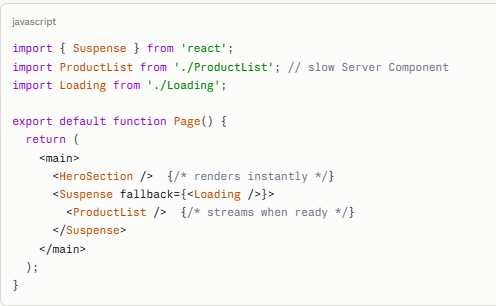
Step 5: Add Suspense Boundaries for Streaming
Wrap slow Server Components in React Suspense to enable streaming — users see fast content immediately while slower data loads in the background:
React Server Components vs Client Components
Understanding when to use each type is the core skill of RSC-based development. Use this table as your daily reference:
| Feature / Capability | Server Components | Client Components |
|---|---|---|
| Runs on | Server only | Browser (+ SSR on server) |
| JavaScript sent to browser | None (0 KB) | Yes — adds to bundle |
| Direct database access | Yes | No — needs API route |
| Access to filesystem | Yes | No |
| useState / useEffect hooks | Not supported | Fully supported |
| Event handlers (onClick, etc.) | Not supported | Fully supported |
| Async data fetching | Native async/await | Via hooks or libraries |
| Access to browser APIs | No | Yes (window, localStorage) |
| SEO friendliness | Excellent (server HTML) | Needs SSR setup |
| Can import Server Components | Yes | No (only as children/props) |
| Bundle size impact | Zero | Adds to bundle |
| API keys / secrets safety | Safe — server-only | Risk of browser exposure |
| Built-in caching support | Yes — fetch cache | Manual (SWR, React Query) |
| Streaming support | Yes — via Suspense | Hydrates after stream |
| When to use | Default (data, layout, display) | Only for interactivity |
Key Benefits for React App Development
30–50% Smaller JavaScript Bundles
Every Server Component eliminates its own JavaScript from the browser bundle. For large applications with dozens or hundreds of components, this compounds dramatically. Teams report bundle reductions of 30–50% on real production codebases — without removing a single feature.
Data Fetching Without the Boilerplate
RSC eliminates the need for useEffect, useState loading states, and data-fetching libraries for server-side data. A Server Component that queries a database looks like a plain async function — because that's exactly what it is. This reduces code complexity and eliminates entire categories of data-fetching bugs.
SEO Out of the Box
Server Components produce fully populated HTML in the initial server response. Search engine crawlers receive complete content without executing JavaScript — a structural SEO advantage for content-heavy pages, product listings, and blog articles.
Security by Architecture
Database credentials, API secrets, and business logic that lives in Server Components never leaves the server environment. There is no runtime mechanism that can accidentally expose them in a browser bundle. This eliminates an entire category of security risk without additional developer effort.
Streaming and Progressive Rendering
React 18's streaming architecture combined with RSC and Suspense enables progressive page loads: fast-rendering sections appear immediately, while slower data-fetching sections stream in as they complete. Users see meaningful content far sooner than with traditional full-page render-then-send approaches.
Real-world result: Teams migrating large Next.js applications to the App Router consistently report 20–50% improvements in Core Web Vitals scores — directly impacting search rankings and conversion rates.
Tools & Technologies for RSC in 2026
| Tool / Technology | Role | RSC Compatibility | Notes |
|---|---|---|---|
| Next.js 14+ | Primary RSC framework | Full (default) | App Router = RSC by default; most mature RSC implementation |
| React 18+ | Core runtime | Required | Streaming, Suspense, and RSC all require React 18+ |
| Turbopack | Build tool | Full | Replaces Webpack in Next.js; significantly faster RSC builds |
| React DevTools | Debugging | Full (RSC panel) | Shows Server vs Client component boundaries in component tree |
| Lighthouse | Performance audit | N/A | Essential for validating LCP, CLS, and bundle size improvements |
| Jest + React Testing Library | Testing | Full (v14+) | Server Components testable as async functions |
| tRPC | Type-safe APIs | Full | Works alongside RSC for client-server communication |
| Prisma / Drizzle ORM | Database access | Full | Use directly inside Server Components — no API route needed |
| Tailwind CSS | Styling | Full | Works in Server Components; no runtime CSS-in-JS issues |
| Vercel / AWS / Railway | Deployment | Full | All support Next.js App Router with streaming and edge runtime |
Cost & Timeline
New Project (Greenfield)
Starting a new React project with RSC from day one adds minimal overhead. Developers familiar with React will need 1–3 days to become comfortable with the Server Component / Client Component boundary model. Architecture decisions take another day or two upfront but pay dividends immediately in simpler, faster code.
| Project Size | Estimated Timeline | Developer Cost (USD) | Key Activities |
|---|---|---|---|
| Small app (< 20 components) | 2–5 days | $1,500 – $4,000 | Architecture, component split, basic data fetching, deployment |
| Medium app (20–100 components) | 2–4 weeks | $8,000 – $25,000 | Above + complex layouts, caching strategy, testing setup |
| Large / Enterprise app | 2–4 months | $40,000 – $150,000+ | Above + auth, multi-tenant, advanced streaming, CI/CD, monitoring |
| Legacy migration (existing React SPA) | 1–8 weeks | $5,000 – $60,000 | Audit, boundary identification, incremental migration, regression testing |
Hire React developers at PerfectionGeeks to get fixed-scope RSC projects delivered on time and on budget. Our React development services include architecture consulting, implementation, and performance validation.
Real-World Examples
Example 1: E-Commerce Product Catalog (UK Fashion Retailer)
A UK-based fashion retailer migrated their Next.js Pages Router product catalog to App Router with RSC. The product listing page — previously a fully client-rendered component that fetched products on load — became a Server Component that queries the database directly.
Results after 6 weeks in production:
- LCP improved from 3.8 s to 1.9 s
- JavaScript bundle dropped from 480 KB to 210 KB
- Organic search impressions increased 18% as Google indexed product pages more reliably
Example 2: SaaS Dashboard Application (AU B2B Company)
A Sydney-based B2B SaaS company rebuilt their analytics dashboard using RSC. Dashboard widgets that display static charts and metrics became Server Components, while interactive filters remained Client Components.
Results:
- Time to Interactive dropped from 4.2 s to 1.6 s
- Database query logic moved directly into Server Components, reducing backend code by approximately 35%
- An entire API proxy service was decommissioned — its sole purpose had been passing database calls to the frontend
Example 3: Content-Heavy Blog / Media Site (CA Tech Publication)
A Canadian tech media publication used RSC with Next.js App Router to rebuild their editorial CMS frontend. Article pages became pure Server Components — fetching content from their headless CMS directly, rendering on the server, and streaming HTML to the browser.
Results:
- Mobile Lighthouse Performance score improved from 54 to 91
- Page ad revenue increased 12% in the first month — attributed to faster load times and improved user engagement metrics
React Development Trends in 2026
| Trend | What It Means | Impact |
|---|---|---|
| RSC as the default React pattern | New React projects start with RSC by default via Next.js App Router; client-only React is now the exception | Critical |
| React Compiler (auto-optimization) | Automatically memoizes components, eliminating useMemo/useCallback in most cases | High |
| Partial Prerendering (PPR) | Combines static (CDN-cached) and dynamic (server-rendered) content on the same page | High |
| Server Actions replacing REST APIs | Form submissions and mutations call server-side functions directly from Client Components | High |
| Full-stack React development | React developers now handle data fetching, auth, and database access directly | Growing |
| RSC testing patterns maturing | Jest + React Testing Library 14+ supports Server Component testing natively | Growing |
| Edge runtime RSC | Server Components running at the edge for global low-latency rendering; TTFB < 100 ms globally | Growing |
Frequently Asked Questions
Quick answers related to this article from PerfectionGeeks.
1. What are React Server Components in simple terms?
2. Do I need Next.js to use React Server Components?
3. Can I mix Server Components and Client Components in the same app?
4. Is it safe to use React Server Components in production in 2026?
Conclusion
React Server Components represent the most significant architectural shift in React's history — more impactful than hooks, context, or Suspense alone, because RSC redefines where React runs, not just how it renders. In 2026, RSC is not a future consideration or a niche optimization. It is the default, recommended, production-ready way to build React applications for performance, SEO, scalability, and security.
Teams that adopt RSC-based architecture today gain compounding advantages: smaller bundles mean faster sites, faster sites rank better, better rankings drive more traffic, and more traffic justifies continued investment in performance. The feedback loop is self-reinforcing.
If you are building a new React application, start with Next.js App Router and RSC by default. If you are maintaining an existing application, begin an incremental migration — start with the highest-traffic, most data-heavy pages and work inward. The performance improvements are measurable, the ecosystem support is mature, and the developer experience in 2026 is better than ever.

Written By Shrey Bhardwaj
Director & Founder
Shrey Bhardwaj is the Director & Founder of PerfectionGeeks Technologies, bringing extensive experience in software development and digital innovation. His expertise spans mobile app development, custom software solutions, UI/UX design, and emerging technologies such as Artificial Intelligence and Blockchain. Known for delivering scalable, secure, and high-performance digital products, Shrey helps startups and enterprises achieve sustainable growth. His strategic leadership and client-centric approach empower businesses to streamline operations, enhance user experience, and maximize long-term ROI through technology-driven solutions.