Published 27 March 2026 | Updated 14 July 2026
App
Why App Usability Is Important in App Development in 2026
App usability plays a critical role in modern app development because users expect fast, intuitive, and seamless digital experiences. Businesses that prioritize usability in app development achieve better customer engagement, higher retention rates, improved app store ratings, and stronger long-term growth. In 2026, app usability optimization has become essential for mobile app success across every industry.
Quick AnswerApp usability refers to how easily users can navigate, understand, and interact with a mobile or web application. High app usability improves user experience, increases retention rates, reduces bounce rates, and helps businesses achieve better customer engagement and conversions. In 2026, businesses prioritize app usability because user expectations are higher than ever. Applications with poor usability often experience low downloads, negative reviews, and reduced customer trust. |
- App usability is the measure of how effectively, efficiently, and satisfyingly real users can complete their goals in your app. It is not a feature — it is a fundamental quality attribute that determines whether your app succeeds or fails in the market.
- The five dimensions of app usability are learnability, efficiency, memorability, error rate, and satisfaction. All five must be addressed in design and verified through testing.
- High app usability produces measurable business outcomes: 35–40% higher 30-day retention, up to 200% higher conversion rates, 4.0+ App Store ratings, and significantly lower support costs.
- The most cost-effective usability investment is early testing — a usability problem caught during wireframing costs a fraction of what it costs to fix post-launch.
- App usability testing with just 5 representative users reveals 85% of problems. Test early, test often, and test with real users — not internal stakeholders.
- In 2026, best app usability incorporates AI-assisted interactions, progressive disclosure for complex apps, accessibility as a baseline requirement, and continuous post-launch measurement via session analytics and in-app feedback.
- PerfectionGeeks has delivered 200+ mobile and web applications since 2014, with usability embedded at every stage of the development lifecycle. Free consultation available for usability audits and new app development projects.
In this blog, we will explore why usability is essential in app development, how it impacts business success, and best practices to implement it effectively.
What Is App Usability? (Quick Definition)
App usability refers to the ease with which users can interact with a mobile or web application to achieve their goals efficiently and without confusion. It focuses on user-friendly navigation, accessibility, responsiveness, intuitive design, performance, and overall user experience.
Modern app usability solutions help businesses create applications that improve customer satisfaction, engagement, retention, and conversion rates across Android, iOS, and web platforms.
Key Statistics:
- A well-designed, usable interface raises conversion rates by up to 200%, while a better overall UX can lift conversions by up to 400% — Forrester Research
- 88% of users say they would not return to an app after a single bad usability experience — Sweor
- Fixing a usability problem after launch costs 100× more than catching it during the design phase — IBM Systems Sciences Institute
- Apps with strong usability ratings see 35–40% higher user retention at the 30-day mark compared to apps with poor usability scores — Localytics, 2024
These numbers explain why the world's best product companies — from Google to Airbnb to Swiggy — invest disproportionately in usability research and testing long before a single line of production code is written.
Why App Usability Is Important in App Development
Mobile users today have extremely short attention spans. Research shows that users often decide whether they like an app within the first few minutes of usage. Poor navigation, slow loading times, confusing interfaces, or complicated onboarding processes can quickly drive users away.
This is why app usability has become a core component of modern application development.
A usable app helps businesses:
- Improve user retention
- Increase customer satisfaction
- Reduce uninstall rates
- Boost engagement
- Improve conversion rates
- Build stronger brand trust
- Increase app store ratings
- Improve customer loyalty
According to industry studies:
- Nearly 90% of users stop using apps due to poor user experience.
- Mobile-friendly and highly usable apps generate significantly higher conversion rates.
- Faster and easier app experiences improve customer retention and engagement.
In highly competitive industries, usability often becomes the deciding factor between app success and failure.
Need Help Improving Your App Usability?
PerfectionGeeks helps startups and enterprises build intuitive, scalable, and user-friendly mobile applications with modern UI/UX strategies, usability testing, and performance optimization.
Whether you need mobile app redesign, UX optimization, or complete application development, our experts can help you create high-converting digital experiences.
Get a Free App Usability Consultation Today
Key Elements of Usability in App Development
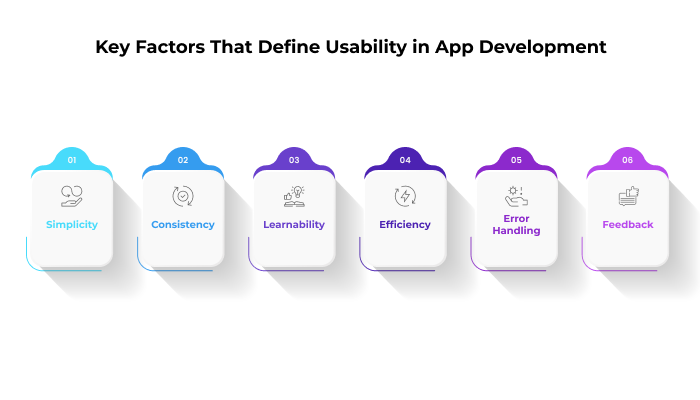
1. Simplicity
Avoid unnecessary complexity. Keep the design clean and minimal.
2. Consistency
Maintain uniform design patterns across the app.
3. Learnability
Users should understand how to use the app quickly.
4. Efficiency
Tasks should be completed in minimum steps.
5. Error Handling
Provide clear error messages and easy recovery options.
6. Feedback
Give users real-time feedback on their actions.
How App Usability Works — The 5 Core Dimensions
Jakob Nielsen's five usability components, first articulated in 1993 and still the industry standard in 2026, provide the clearest framework for understanding what app usability actually means in practice:
1. Learnability How easy is it for first-time users to accomplish basic tasks the very first time they open your app? Learnability is measured by time-to-first-success: how long does it take a new user, without any help, to complete the primary action your app was designed for? An app with high learnability has a self-explanatory interface where the correct next action is always obvious. Apps that require an onboarding tutorial to be usable have a learnability problem.
2. Efficiency Once users have learned how the app works, how quickly can they perform recurring tasks? Efficiency is the usability dimension most relevant to daily-use apps — banking apps, productivity tools, food ordering apps. Every additional tap, every extra scroll, every confirmation screen adds friction and reduces efficiency. The benchmark question is: what is the minimum number of interactions required to complete the core task, and does our app achieve that minimum?
3. Memorability When users return to your app after not using it for a week or a month, how quickly do they re-establish proficiency? Apps with low memorability punish occasional users — and for most apps, the majority of your user base is occasional users. Memorability is driven primarily by consistency: consistent navigation patterns, consistent icon meanings, consistent placement of key actions across screens.
4. Error Rate How often do users make mistakes — tapping the wrong button, entering data in the wrong format, navigating to the wrong screen — and how easily can they recover? Low error rate is partly a design problem (error-prone designs invite mistakes) and partly an error-recovery problem (every error your app cannot recover from gracefully is a user you may lose permanently). The best app usability keeps both error frequency and error severity low.
5. Satisfaction How pleasant is it to use the app? This is the most subjective of the five dimensions but also one of the most commercially important. An app can be learnable, efficient, memorable, and low-error-rate, and still feel unpleasant to use — because the visual language is cold, the micro-interactions are absent, or the tone of the copy is wrong. Satisfaction is what turns functional apps into apps people actively enjoy using and recommend to others.
Key Benefits of High App Usability
Investing in app usability at every stage of development delivers measurable returns across every key product and business metric:
Higher User Retention. Users who find an app easy to use return more frequently and stay longer. The 30-day retention rate for apps with strong usability is consistently 35–40% higher than the category average. In a market where acquiring a new app user costs $2–$5 (and up to $50 for high-intent verticals), retention is the most direct ROI metric for usability investment.
Better App Store Ratings. The single biggest driver of negative 1-star and 2-star reviews in both the App Store and Google Play is usability failure — confusing navigation, broken flows, unclear error messages. Apps that invest in usability testing before launch consistently ship with 4.0+ ratings versus the 2.5–3.0 ratings that usability-neglecting apps average in their first 30 days.
Higher Conversion Rates. Whether your conversion event is a registration, a purchase, a subscription, or a form submission, usability frictions on the path to that event destroy conversion. Research consistently shows that reducing the steps to checkout by even one step lifts conversion by 10–25%. Best app usability principles applied to conversion flows — clear CTAs, minimal form fields, obvious next-steps — compound into significant revenue impact.
Reduced Support Costs. Every usability failure that reaches a user generates either a support ticket or an app uninstall. Companies that track support ticket content typically find that 60–70% of tickets are actually usability complaints — users who couldn't find a feature, couldn't understand an error, or couldn't complete a flow. Fixing the underlying usability issue eliminates those tickets permanently.
Lower Development Rework Cost. The IBM cost-of-change data remains the most cited statistic in software usability: a problem caught during requirements costs $1 to fix; the same problem caught after launch costs $100. App usability testing during design and prototyping is not an additional cost — it is a cost-reduction mechanism. Teams that test early and often consistently ship with fewer post-launch fixes.
Competitive Differentiation. In any mature app category, functional parity between competing apps is now the norm. What differentiates winners from losers is experience quality — and experience quality is primarily a usability outcome. Apps that feel effortless to use command higher NPS, higher word-of-mouth referral, and higher willingness to pay.
App Usability Testing Cost in 2026
App usability testing cost depends on project complexity, testing methods, audience size, and platforms involved. Basic usability audits may start from $2,000–$5,000, while enterprise-level UX research and testing can exceed $20,000 depending on app scale and testing requirements.
Usability vs Poor Usability — Real Comparison
The practical difference between high and low app usability is not abstract. Here is how it plays out across the metrics that determine product success:
| Metric | High App Usability | Poor App Usability |
|---|---|---|
| Time-to-first-action | Under 60 seconds for new users | 3–5 minutes or task abandoned |
| 30-day retention | 35–45% | 10–20% |
| App Store rating | 4.2–4.8★ | 2.5–3.2★ |
| Support ticket volume | Low (usability issues pre-resolved) | High (60–70% are usability complaints) |
| Conversion rate | 3–8% (varies by category) | 0.5–2% |
| User-reported NPS | +40 to +70 | −10 to +15 |
| Post-launch rework cost | Low (issues caught in testing) | High (major redesigns within 6 months) |
| Word-of-mouth referral | Frequent ("this app just works") | Negative ("so frustrating to use") |
The pattern across all these metrics is consistent: app usability for startups and established products alike is the highest-leverage investment available to a product team, delivering returns across acquisition, retention, monetisation, and support simultaneously.
Step-by-Step Guide to Improving App Usability
The following framework is the approach PerfectionGeeks uses across all mobile and web application projects to build measurably high app usability from the first sprint to post-launch:
Step 1: User Research (Before Any Design) Before a single wireframe is drawn, understand who will actually use the app and what they are actually trying to do. This means structured user interviews (not surveys — interviews), task analysis, and the construction of 2–3 validated user personas with real behavioral data, not assumed demographics. The most common usability failure in app development is building for the product team's mental model rather than the user's mental model. User research closes that gap.
Step 2: Define Usability Goals Per User Flow For each primary user flow in the app — onboarding, core task completion, settings, error recovery — define measurable usability targets before design begins. What is the acceptable time-to-completion for a new user? What is the maximum number of taps to complete the primary action? What error rate is acceptable? Without defined targets, usability cannot be tested meaningfully.
Step 3: Low-Fidelity Wireframing and Early Testing Build paper prototypes or low-fidelity digital wireframes of key flows and test them with 5 real users (Nielsen's research shows 5 users reveal 85% of usability problems). This testing costs almost nothing — no code has been written — and consistently surfaces fundamental navigation and hierarchy problems that would be expensive to fix post-development. This is the highest-ROI usability investment available.
Step 4: UI/UX Design with Heuristic Review Apply Jakob Nielsen's 10 usability heuristics as a design checklist during the visual design phase. The heuristics cover: visibility of system status, match between system and real world, user control and freedom, consistency and standards, error prevention, recognition rather than recall, flexibility and efficiency of use, aesthetic and minimalist design, help users recognise/diagnose/recover from errors, and help and documentation. A design that passes all 10 heuristics will have significantly fewer usability problems in testing.
Step 5: Interactive Prototype Testing Build a clickable high-fidelity prototype (using Figma or Adobe XD) and conduct moderated usability testing with 8–10 users from your target audience. Record sessions. Observe — do not help. Note every moment of hesitation, confusion, or error. This is the phase where most app usability issues are discovered and resolved before a single line of production code is written.
Step 6: Development with Usability Checkpoints During development, conduct heuristic reviews at each sprint milestone — not just at the end of the project. Each new screen, each new flow, each new interaction pattern should be reviewed against usability standards before it is merged. This keeps the cost of usability fixes at the design-phase level rather than the post-launch level.
Step 7: Pre-Launch Usability Testing Before release, conduct a final round of moderated usability testing on the production build with 5–8 new participants who have never seen the app. Focus on the three flows most critical to your product's success metric. Any task completion rate below 80% is a launch risk that should be resolved before release.
Step 8: Post-Launch Analytics and Continuous Improvement After launch, instrument the app with session recording (Hotjar, FullStory, or Mixpanel), funnel analytics, and in-app feedback prompts. Review usability data monthly. Prioritise fixes by the volume of users affected multiplied by the severity of the impact. App usability improvement is not a project — it is a continuous practice that the best product teams embed in every sprint cycle.
How PerfectionGeeks Ensures High Usability
At PerfectionGeeks, we follow a user-centric approach to development. As a trusted Mobile app development Company in Gurugram, India, we integrate usability into every stage of the development lifecycle.
Our Approach:
1. User Research
We analyze user behavior, preferences, and expectations.
2. Wireframing & Prototyping
We create intuitive layouts before development begins.
3. UI/UX Design
We focus on clean, modern, and responsive designs.
4. Usability Testing
We test applications with real users to identify issues.
5. Continuous Improvement
We refine the app based on feedback and analytics.
Usability Testing Methods Explained
App usability testing is the practice of observing real users attempting to complete real tasks in your app, to identify where the design fails them. The main methods in 2026:
Moderated In-Person Testing is the gold standard. A facilitator sits with each participant, gives them tasks without guidance, and observes. The facilitator can ask follow-up questions ("What were you expecting to happen there?") that reveal the mental models behind user behaviour. Best for discovering deep usability problems. Cost: $3,000–$8,000 for a full round of 5–8 participants.
Moderated Remote Testing achieves similar outcomes via video call with screen sharing. The participant is in their own environment (which is often more realistic for a mobile app) and the facilitator observes remotely. Slightly less rich than in-person but considerably cheaper and faster to recruit for. Cost: $1,500–$4,000.
Unmoderated Remote Testing via platforms like UserTesting.com or Maze sends participants a set of tasks to complete independently, recording their screen and face. No facilitator — the recordings are reviewed after. Best for high-volume, quantitative usability data. Cost: $500–$2,000.
Heuristic Evaluation involves a UX expert (or a team of 3–5 experts) reviewing the app against established usability heuristics without user involvement. Fast and inexpensive ($1,500–$5,000) and effective at catching standard usability violations — though it misses user-specific issues that only emerge from real user observation.
A/B Testing compares two versions of a screen or flow by splitting live user traffic and measuring which version produces better outcomes (higher completion rate, lower bounce rate, higher conversion). Best for optimising known flows rather than discovering unknown usability problems. Cost: built into most analytics platforms.
The best app usability programmes combine methods: heuristic evaluation during design, moderated prototype testing before development, and A/B testing and analytics post-launch. Each method reveals a different class of usability problem.
Common App Usability Mistakes to Avoid
These are the patterns PerfectionGeeks sees most frequently in apps that arrive for usability audits with low ratings, high uninstall rates, or poor conversion:
Designing for the expert user, not the new user. The team building the app knows it intimately — so they design for their own mental model. New users arrive with completely different expectations. Testing only with internal team members and stakeholders (who are never representative users) produces apps that insiders find obvious and outsiders find baffling.
Prioritising visual novelty over established conventions. Custom navigation patterns, non-standard icon meanings, and creative-but-unfamiliar interaction metaphors all reduce learnability and memorability. Users bring expectations built from thousands of hours of prior app usage. When your app violates those conventions without delivering clear compensating value, usability suffers. Creativity in visual design is valuable; creativity in navigation patterns is expensive.
Overloading the interface with features. Feature accumulation is the most common cause of poor app usability in enterprise and productivity apps. Every feature added to a screen increases cognitive load for every user, including users who never need that feature. Ruthless prioritisation — designing each screen to support one primary action — is not a compromise, it is the correct design decision.
No error prevention and no error recovery. Apps that allow users to make irreversible mistakes without confirmation ("Are you sure you want to delete this?"), and apps that display cryptic error messages without actionable guidance ("Error 403" with no explanation), both fail the user in the same fundamental way. Design errors out of reach first; make recovery effortless when errors still occur.
Skipping usability testing due to time pressure. The most expensive usability mistake is not testing at all. Every week of development on a design that has never been shown to a real user accumulates usability debt that must be repaid after launch — at 10–100× the cost of fixing it during design. "We'll test after we ship" is how apps accumulate 2-star reviews in their first week.
Treating accessibility as optional. In 2026, accessibility is both a legal requirement in many jurisdictions and a usability necessity. Approximately 15% of the global population lives with some form of disability. Apps that fail basic accessibility standards — adequate contrast ratios, screen reader compatibility, touch target sizing — are failing a substantial fraction of their potential user base, and increasingly face regulatory consequences.
Expert Tips for App Usability in 2026
The practices that the PerfectionGeeks UI/UX team applies across all app development projects to achieve consistently high app usability scores:
Prioritize Mobile-First Design
Most users interact with apps through smartphones, so designing for smaller screens first improves navigation, readability, and overall usability across devices.
Use AI-Powered Personalization
AI-driven recommendations, smart search, and personalized user experiences help increase engagement and improve customer satisfaction within mobile applications.
Focus on Fast Loading Speed
Users expect apps to load within seconds. Optimizing APIs, images, databases, and backend performance helps improve app usability and reduce bounce rates.
Simplify User Navigation
Clear menus, intuitive workflows, and minimal steps help users complete actions faster. Simple navigation significantly improves user retention and engagement.
Improve Accessibility Features
Modern apps should support accessibility features such as voice navigation, scalable fonts, color contrast optimization, and screen reader compatibility to reach wider audiences.
Conduct Continuous Usability Testing
Regular usability testing helps businesses identify navigation issues, design flaws, and user frustrations before they impact customer retention and app performance.
Optimize Micro-Interactions
Small animations, visual feedback, and smooth transitions improve the overall user experience and make the application feel more interactive and responsive.
Leverage Behavioral Analytics
Tracking user behavior through analytics tools helps businesses understand how users interact with the app and identify opportunities for UX improvements.
Minimize User Input
Reducing unnecessary forms and typing requirements through autofill, smart suggestions, and automation improves app usability and user convenience.
Maintain Consistent UI/UX Design
Consistent colors, typography, layouts, and button styles create familiarity and improve navigation efficiency across the entire application.
Frequently Asked Questions
Quick answers related to this article from PerfectionGeeks.
1. What is app usability?
2. Why is app usability important for mobile applications?
3. What are the five components of app usability?
4. How much does app usability testing cost?
5. How can I improve my app's usability?
Conclusion
Usability is not just an optional feature—it is a necessity for successful app development. A well-designed, user-friendly application leads to:
- Higher user satisfaction
- Better engagement
- Increased conversions
- Reduced development costs
At PerfectionGeeks, we understand the importance of usability and integrate it into every project we deliver. As a leading Mobile app development Company in Gurugram, India, we help businesses worldwide build applications that users love.
👉 Contact us today to create a highly usable and successful application for your business.

Written By Shrey Bhardwaj
Director & Founder
Shrey Bhardwaj is the Director & Founder of PerfectionGeeks Technologies, bringing extensive experience in software development and digital innovation. His expertise spans mobile app development, custom software solutions, UI/UX design, and emerging technologies such as Artificial Intelligence and Blockchain. Known for delivering scalable, secure, and high-performance digital products, Shrey helps startups and enterprises achieve sustainable growth. His strategic leadership and client-centric approach empower businesses to streamline operations, enhance user experience, and maximize long-term ROI through technology-driven solutions.
.webp)